
Downloaded from hlayiso.com
NATIONAL
SENIOR CERTIFICATE
GRADE 12
SEPTEMBER 2018
COMPUTER APPLICATIONS TECHNOLOGY P1
MARKING GUIDELINE
NAME OF CANDIDATE: GRADE:
SIGNATURE OF EDUCATOR:
TOTAL Q1 Q2 Q3 Q4 Q5 Q6 Q7
MARKS: 180 37 13 53 41 20 12 04
This marking guideline consists of 13 pages.
Skip to contentMemorandum 




_hlayiso.com_--c01cc76d-6be5-4f8e-b0dd-c7487e06934f/v1-34719e235a0428d8db32/card.webp)
View all




Computer Applications Technology Grade 12 P1 2018 Memo (Eng)
Grade 12 Computer Applications Technology Paper 1 memorandum from the Eastern Cape Mock Exam 2018 (English), 14 pages. Read online or get the free PDF download, question paper linked when available.
Computer Applications Technology · Grade 12 · Eastern Cape Mock Exam · 2018 · English. Memorandum, 14 pages. Read online or download the PDF.
- Subject
- Computer Applications Technology
- Grade
- Grade 12
- Language
- English
- Document type
- Memorandum
- Year
- 2018
- Exam period
- Eastern Cape Mock Exam
- Paper
- 1
- Curriculum
- CAPS
- Pages
- 14
- File size
- 380.5 KB
Loading document…
Loading document…
1 of 14
Document textSearch extracted text and jump to a page.
Downloaded from hlayiso.com
2 COMPUTER APPLICATIONS TECHNOLOGY P1 (EC/SEPTEMBER 2018)
QUESTION 1 File Name: 1_Triathlon Total Q1: 37
Maximum Candidate
No. Criteria
Mark Mark
1.1 Margin 1 1
Top and bottom margins set to 2 cm
1.2.1 First Page 1 1
Cover page Ion (Dark) inserted
1.2.2 Title Control 1 1
Triathlon added in title text box
1.2.3 Year Control 1 1
2018 added in the Year textbox
1.3 Table of Contents 1 1
Table of contents inserted
1.4.1 Style 1
Font colour changed to red 2
Set to Underline 1
1.4.2 Style 1 1
Modified style applied to all Heading 2 headings
1.5 Dropped Cap 1 3
Dropped cap applied on ‘A’ 1
Applied over 3 lines 1
Spacing set to 0.5 cm from text
1.6 Paragraph formatting 1 2
Line spacing set to 1.5 pt
Paragraph is justified 1
1.7 Hyperlink 1 2
Hyperlink set
Linked to the heading History of Triathlon in South 1
Africa
1.8 Bullets 1 2
1_Picture.jpg used as a bullet
List indents set to a space after number 1
1.9 Table 1 6
Text converted to table 1
Table has 4 columns 1
Table style Grid Table 4 Accent 2 applied 1
Change row height of all rows 1
To exactly 1 cm
1
Contents of the table centred vertically
1.10 Picture 1 3
1_Triathlon.png inserted
Correct caption applied 1
Table of figures updated 1
Copyright reserved Please turn over
Downloaded from hlayiso.com
(EC/SEPTEMBER 2018) COMPUTER APPLICATIONS TECHNOLOGY P1 3
1.11 Footnote 1 3
Footnote added 1
Footnote added below text 1
Footnote text is ‘www.triathlonsa.co.za’
1.12 Numbering 1 2
Automatic numbering applied to References
Alphabets are used in numbering 1
1.13 Page numbering 1 6
Page numbers inserted in the footer 1
Page numbers are centre aligned 1
Numbering starts as 1 on the Table of Contents page 1
Formatted as Page1 of 1 style 1
Odd page numbers aligned on the left 1
Even page numbers aligned on the right
Total for QUESTION 1 [37]
Copyright reserved Please turn over
Downloaded from hlayiso.com
4 COMPUTER APPLICATIONS TECHNOLOGY P1 (EC/SEPTEMBER 2018)
QUESTION 2 File Name: 2_Triathlon flyer Total Q2: 13
Candidate
No. Criteria Maximum Mark
Mark
2.1 Paper size 1 1
Paper size set to A5
2.2 Watermark 1 2
Picture scale set to 500% 1
Washout effect removed
2.3 WordArt 1 2
Stop text effect transformation applied 1
to the WordArt
2.4 Picture 1 4
Picture centre aligned 1
Picture is the same size as other pictures
(3.3cm x 4.4 cm)
Glow 18 Point Orange picture effect applied 1
Picture effect applied to all pictures
1
2.5 Shapes 1 4
Horizontal scroll shape inserted 1
with Light 1 outline
1
with Orange fill Accent 2
and text ‘It’s a showdown!’ inserted. 1
Total for QUESTION 2 [13]
Copyright reserved Please turn over
Downloaded from hlayiso.com
(EC/SEPTEMBER 2018) COMPUTER APPLICATIONS TECHNOLOGY P1 5
QUESTION 3 File Name: 3_Recording Total Q3: 53
Maximum Candidate
No. Criteria
Mark Mark
Results worksheet
3.1.1 Row 1 and Row 2 1 1
Row 1 and 2 Merged from cell A1:O2.
3.1.2 Text 1 1
Text Triathlon SA Results Water Park is inserted in
merged cells
3.1.3 Fill 1 1
Any gradient fill is applied to merged cells
3.1.4 Row 3 1 1
Row 3 is wrapped
3.2 Freeze panes 1 2
Freeze pane effect applied 1
Correct Row (Row 3)
3.3 Cell A4 6
=CONCATENATE (C4,"/", randbetween(1,999),"/",2018)
Or
1
=CONCATENATE (C4,"/", Q4,"/",2018)
1
Function: Concatenate 1
Cell C4
/ 1
Randbetween(1,999) 1
Current year 2018 1
Function in Cell A4 copied down
(Note to marker: Q4 or any relevant cell used for random
values.)
3.4 Column K : Conditional Formatting 1 3
Conditional formatting applied to column K 1
Bottom criterion used
Bottom 3 athletes shaded in blue 1
3.5 Cell M5 1 4
=VLOOKUP(K5,Table!$A$1:$B$5,2) 1
Lookup value: K5
Lookup range: Table!$A$1:$B$5 1
Absolute cell reference on the entire range 1
Correct column: 2
Copyright reserved Please turn over
Downloaded from hlayiso.com
6 COMPUTER APPLICATIONS TECHNOLOGY P1 (EC/SEPTEMBER 2018)
4
3.6 Cell N6
1
=IF(M6="Platinum",10000,IF(M6="Gold",8000,IF(M6="Silver
",5000,IF(M6="Bronze",3000,"-"))))
1
Nested IF function correctly used
1
Condition for Platinum and Gold
Condition for Silver and Bronze 1
Value false
3.7 Cell O4 3
=K4-(G4+I4) 1
=K4 Minus sign (-) 1
(G4+I4) 1
Correct use of brackets
3.8 Cell L72 1 4
=SUMIF(C4:C70,"ZIM",L4:L70)
1
Function: SUMIF
Criteria range: C4:C72 1
Criteria: "ZIM”
Sum range: L4:L70 1
3.9 Cell L74 6
=(countif(C4:C70, “ZIM”)*1000)-L72
1
Function: Countif
Range: C4:C70 1
Criteria: ZIM
*1000 1
Minus sign (-) 1
1
L72
1
(Note to marker : 13000 (13 ZIM athletes X 1000)
3.10 Cell L76 1 2
=COUNTBLANK(L4:L70)
Function: Countblank 1
Criteria range (L4:L70)
Copyright reserved Please turn over
Downloaded from hlayiso.com
(EC/SEPTEMBER 2018) COMPUTER APPLICATIONS TECHNOLOGY P1 7
3.11 Cell K78 1 2
=AVERAGE(K4:K70)
Average function 1
Criteria range (K4:K70)
3.12 Cell K80 1 2
=MODE.SNGL(K4:K70)
Mode function 1
Criteria range (K4:K70)
3.13 Cell K84 1 5
=COUNTIFS(F4:F70,"<00:07:00",H4:H70,"<00:22:00") 1
Function: COUNTIFS 1
Criteria range1: F4:F70
Criteria 1: "<00:07:00", 1
Criteria range 2: H4:H70
Criteria 2: "<00:22:00" 1
3.14 Graph Worksheet 1 6
Chart / Graph title changed to Triathlon 1
Championships
Vertical axis title ‘Time’ added 1
Horizontal axis rotated to 270 degrees
Legend series edited 1
Gradient Fill applied in the chart area 1
Graph moved to a new sheet called Triathlon 1
Total for QUESTION 3 [53]
Copyright reserved Please turn over
Downloaded from hlayiso.com
8 COMPUTER APPLICATIONS TECHNOLOGY P1 (EC/SEPTEMBER 2018)
QUESTION 4 File Name: 4_Triathlon Records Total Q4: 41
Maximum Candidate
No. Criteria
Mark Mark
Table: Athletes table
4.1.1 Field: Athlete Code 1 1
Field size set to 08
4.1.2 Field: Athlete Code 4
1
>LLL000LL;;
Capital letters: > 1
LLL – three compulsory letters 1
000 – three compulsory digits
LL – two compulsory letters 1
4.1.3 Primary key 1 1
Primary key set to Athlete Code field or ID No field
4.1.4 DOB Field 1 1
Date set to Medium Date
4.1.5 Disability Field 1 1
Set to Yes / No or True / False
4.1.6 Fees Field 1 1
Default value set to R10 000.00
4.1.7 Province Field 1 1
‘ZIM’ added in Row Source
‘ZIM’ is first on the list
4.1.8 Last RaceField 3
1
LastRace field set as required
1
Validation rule: >#2015/01/01#
1
Appropriate validation text added
4.2 Form: frm4_2 6
1
1
Background colour of the form changed to ‘Blue’
1
Title changed to ‘Results Championship’
Picture 4_Logo inserted 1
Picture aligned on the right
Action Button added 1
Action button closes the form 1
Copyright reserved Please turn over
Downloaded from hlayiso.com
(EC/SEPTEMBER 2018) COMPUTER APPLICATIONS TECHNOLOGY P1 9
4.3 Qry4_3 1 5
Criteria Age field: Between 20 And 30 1
Criteria Gender field: M 1
Criteria Cell number field: 084*
Fields Gender and Age do not show 1
Sorted: Athlete Name field 1
4.4 Qry4_4 1 3
Province / Nationality: Total: Grouped by 1
Registration Fee: Total: Sum 1
Criteria: ZIM
4.5 Qry4_5 5
Refund: [Registration Fee]*10/100+100 1
Calculated field name: Refund 1
[Registration Fee] 1
*
10/100 or 0.1 1
+100 1
4.6 Report4_6 1 8
Report is created with all the required fields 1
Report is grouped according to Province / 1
Nationality field
Then is grouped according to Gender field 1
Report sorted according to the Athlete Name field 1
Set to landscape
1
Calculation on the footer of the Gender field:
=Sum([Registration Fee]) 1
Total amount is in any currency format 1
Total for QUESTION 4 [41]
Copyright reserved Please turn over
Downloaded from hlayiso.com
10 COMPUTER APPLICATIONS TECHNOLOGY P1 (EC/SEPTEMBER 2018)
QUESTION 5 File Name: 5_Triathlon Website Total Q5: 20
This question should be marked from the browser as far as possible, unless otherwise
indicated or if it cannot be seen on the browser.
A maximum of 1 mark will be deducted if one or more closing tags are omitted.
Maximum Candidate
No. Criteria
Mark Mark
5.1 Title 2
<title>Triathlon</title> 1
Title tag added 1
Triathlon appears on the browser
5.2 Heading: Triathlon 1 2
<h1 align ="center"><font color = "red">
Triathlon</font></h1> 1
Heading centred
Font colour changed to red
5.3 Horizontal line 1 2
<hr color = "red" width =50%>
Size of line changed to 50% 1
Line colour changed to red
5.4 Bulleted list 1 2
<ul type = Square></ul>
Unordered list <ul> created 1
Type of bullet set to square
5.5 Picture and Border 1 4
<p align = "center" ><img src ="5_Picture.jpg" border 1
="5" alt = "Swimming" height = 200 width = 300></p> 1
Correct picture used
Swimming shows when the picture is not
displaying (Alt=Swimming) 1
Picture aligned to centred
Border around picture 5 pt
Copyright reserved Please turn over
Downloaded from hlayiso.com
(EC/SEPTEMBER 2018) COMPUTER APPLICATIONS TECHNOLOGY P1 11
5.6 Table 1 5
First row added – <th>
Correct text added
<tr> 1
<th>Time</th> 1
<th>Medal</th>
<th>Prize</th> 1
</tr>
Table border set at 1
Cellpadding set at 10
1
<table border = 1 cellpadding = "10">
Colspan = “3”
<tr><td colspan ="3" > Good Luck </td></tr>
5.7 Link 1 3
<a href = "2018 Race.pdf"> another race </a> 1
<a href> </a>
Link created on the text ‘another race’ 1
Link opens ‘2018 Race.pdf’
Total for QUESTION 5 [20]
Copyright reserved Please turn over
Downloaded from hlayiso.com
12 COMPUTER APPLICATIONS TECHNOLOGY P1 (EC/SEPTEMBER 2018)
QUESTION 6 File Name: 6_Letter Total Q6: 12
Candidate
No. Criteria Maximum Mark
Mark
6.1.1 Date 1 2
Today’s date inserted
Does not update 1
6.1.2 Comment 1 2
International changed to National
Comment deleted 1
6.1.3 Tabs
Leader tabs/tab set to approximately 5 cm, 10 cm 1 4
and 15 cm
Only left and right tabs used 1
Tab leaders added in two cases 1
All tabs correctly applied
1
6.2 Mail Merge 4
Both Surname and Name merge fields inserted in 1
correct positions
Filtering applied to athletes who are from RSA
Letters sorted in alphabetical order according to 1
last name
Mail Merge is completed and saved as 6_Merged
Letters 1
(Note to marker: Expect 06 letters.)
1
Total for QUESTION 6 [12]
Copyright reserved Please turn over
Downloaded from hlayiso.com
(EC/SEPTEMBER 2018) COMPUTER APPLICATIONS TECHNOLOGY P1 13
QUESTION 7 File Name: 7_Newspaper Article Total Q7: 04
7_Newspaper Article
Candidate
No. Criteria Maximum Mark
Mark
7.1 Spell check 1 1
Color replaced with colour (Spell Check
changed to English South Africa)
7.2 Synonym 1 1
Celebrating replaced by rejoicing
7.3 Font scaling 1 1
Character scale set on 200%
7.4 Link 1 1
Pdf icon on the shape links the file” 7_Nutritional
Requirements of an Athlete.pdf”
Total for QUESTION 7 [4]
TOTAL: 180
Copyright reserved Please turn over
Downloaded from hlayiso.com
Study this subject
Revise the topics in this paper, then practise them question by question.
- Grade 12 Computer Applications Technology notes
CAPS revision notes with worked examples.
- Computer Applications Technology questions by topic
Past exam questions sorted by CAPS topic, with memos where available.
- Grade 12 Computer Applications Technology quizzes
Short topic quizzes with instant feedback.
- All Grade 12 Computer Applications Technology past papers
Past papers by year, with memos where available.
- Grade 12 past papers
More Computer Applications Technology and other subjects in this collection.
Recommended for this subject
More papers and memos for this grade and subject.
Memorandum
Computer Applications Technology Grade 12 P1 2025 Memo
Memorandum
Computer Applications Technology Grade 12 P2 2025 Memo
Memorandum
Computer Applications Technology Grade 12 P1 NSC June 2025 Memo
Memorandum
Computer Applications Technology Grade 12 P1 2024 Memo (Eng)
Memorandum
Computer Applications Technology Grade 12 P1 2022 Memo (Eng)
Memorandum
Computer Applications Technology Grade 12 P1 2021 Memo
Related documents
Memorandum
Computer Applications Technology Grade 12 P1 2019 Memo (Eng)
Question paper
Computer Applications Technology Grade 12 P1 2022 QP (Eng)
Question paper
Computer Applications Technology Grade 12 P1 2020 QP (Eng)
Errata
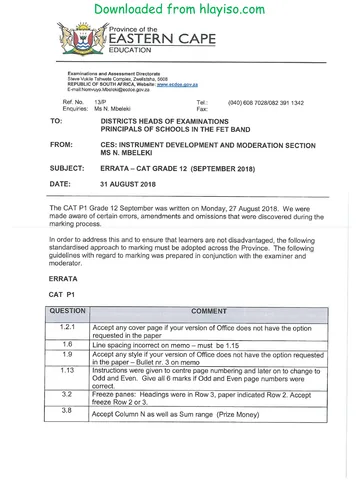
Computer Applications Technology Grade 12 P1 2018 Errata
Memorandum
Computer Applications Technology Grade 12 P2 2019 Memo (Eng)
Memorandum
Computer Applications Technology Grade 12 P2 2017 Memo (Eng)
More from Grade 12 Computer Applications Technology
Question paper
Computer Applications Technology Grade 12 P2 2025 QP
Question paper
Computer Applications Technology Grade 12 P1 2024 QP (Eng)
Question paper
Computer Applications Technology Grade 12 P2 2024 QP (Eng)
Question paper
Computer Applications Technology Grade 12 P1 November 2024 NSC QP
Question paper
Computer Applications Technology Grade 12 P1 2024 QP
Question paper