
Downloaded from hlayiso.com
NATIONAL SENIOR CERTIFICATE EXAMINATION
NOVEMBER 2019
INFORMATION TECHNOLOGY: PAPER I
MARKING GUIDELINES
Time: 3 hours 180 marks
These marking guidelines are prepared for use by examiners and sub-examiners,
all of whom are required to attend a standardisation meeting to ensure that the
guidelines are consistently interpreted and applied in the marking of candidates'
scripts.
The IEB will not enter into any discussions or correspondence about any marking
guidelines. It is acknowledged that there may be different views about some
matters of emphasis or detail in the guidelines. It is also recognised that,
without the benefit of attendance at a standardisation meeting, there may be
different interpretations of the application of the marking guidelines.
IEB Copyright © 2019 PLEASE TURN OVER
Skip to contentMemorandum 
View all
Information Technology Grade 12 IEB Paper 1 2019 Memo
IEB Grade 12 Information Technology Paper 1 memorandum from the 2019, 11 pages. Read online or get the free PDF download, question paper linked when available.
Publisher: IEB
Information Technology · Grade 12 · 2019. Memorandum, 11 pages. Read online or download the PDF.
- Subject
- Information Technology
- Grade
- Grade 12
- Document type
- Memorandum
- Year
- 2019
- Paper
- 1
- Publisher
- IEB
- Curriculum
- IEB
- Pages
- 11
- File size
- 360.9 KB
Loading document…
Loading document…
1 of 11
Document textSearch extracted text and jump to a page.
Downloaded from hlayiso.com
NATIONAL SENIOR CERTIFICATE: INFORMATION TECHNOLOGY: PAPER I – MARKING GUIDELINES Page 2 of 11
SECTION A SHORT QUESTIONS
QUESTION 1 DEFINITIONS
1.1 Firmware/BIOS Accept embedded operating system/mobile operating system
1.2 Defragmentation Accept defragment/defragmenting
1.3 Virtual Private Network (VPN)
1.4 Plug in /RIA Accept extension/add-on
1.5 Cookie
1.6 Blackfish / MySQL/Postgre/JavDB NOT ACCESS
1.7 Semantic search NOT SEO
1.8 Public key Asymmetric key
1.9 Interrupt
1.10 Hot swapping / hot plugging
QUESTION 2 MATCHING COLUMNS
2.1 D
2.2 H
2.3 K
2.4 L
2.5 C
2.6 E
2.7 I
2.8 M
2.9 A
2.10 B
SECTION B SYSTEM TECHNOLOGIES
QUESTION 3
3.1 AMD, Qualcomm, NVIDIA, IBM, Samsung, Motorola, HP, ARM, Hauwei
Accept any correct name
3.2 The hardware in a computing device where the operating system (OS),
application programs and data in current use are stored. for mentioning OS,
applications or data; for current use. OR A component that stores currently
loaded programs and data. Don’t accept just "instructions"
3.3 3.3.1 High
3.3.2 Graphics card
3.4 3.4.1 The clinic will need to be able to run the laptops all day as the clinics
are mobile and might not have access to a regular power supply. If
there is a power supply, they might be affected by load shedding. If they
chose the standard battery they would have to be assured of a power
supply or take a UPS or other backup battery pack with them. Other
options to accept: length of working day, power outages (similar to load
shedding), battery charges faster, higher res screen drains battery
faster Looking for: Unreliable power supply, availability of power, length
of day: these are the critical factors for TWO correct facts
IEB Copyright © 2019 PLEASE TURN OVER
Downloaded from hlayiso.com
NATIONAL SENIOR CERTIFICATE: INFORMATION TECHNOLOGY: PAPER I – MARKING GUIDELINES Page 3 of 11
3.4.2 (a) The process of increasing the clock speed/rate of a
component resulting in the component running faster than it
was designed to run. OR increase the clock multiplication
factor of a component OR increase the system bus speed
hence increasing all components
(b) The CPU would use more power as it is working at a faster
rate; there would be a need for more cooling for the CPU
which will also use more power for TWO correct facts. Don’t
accept just "component will fail."
3.4.3 Because an SSD has no moving parts; less heat is generated by an
SSD therefore less cooling is needed. Accept start-up efficiency in
various forms; data transfer takes place faster, use for less time for
TWO correct reasons
3.5 3.5.1 Type of RAM: SRAM or Static RAM
Characteristic: Faster than normal DRAM; doesn’t need to be
refreshed. Accept differentiation of component of SRAM vs DRAM
3.5.2 A processor cache only stores very small amounts of data at one
time in the form of the next instructions the CPU is likely to need
whereas RAM has to store larger amounts of data for the operating
system, applications etc. A 3MB cache is quite adequate for what is
to be stored there because instructions used by the CPU are each
very small.
3.6 3.6.1 Controlling hardware and software resources
Loading and running application programs
Providing a user interface
3.6.2 Choose from: Windows, Linux, and other valid operating system for a
laptop. Accept MacOS. Ubuntu: stripped-down version, uses less
power
Justification must match the operating system, e.g.: Windows: well
known – used by lots of people; good support. Linux: free; open
source so can be modified for organisation's needs
Ref to scenario would boost Windows option: People working there
are most likely to have encountered Windows as an OS.
3.7 3.7.1 There could be business-related classified information on the laptop;
there are confidential medical records of patients on the laptop.
3.7.2 (a) A data/file encryption technique that uses a 256-bit key to
encrypt and decrypt data or files. Accept an explanation which
uses 2^256 combinations/alternatives. Don’t accept
re-wording of question.
IEB Copyright © 2019 PLEASE TURN OVER
Downloaded from hlayiso.com
NATIONAL SENIOR CERTIFICATE: INFORMATION TECHNOLOGY: PAPER I – MARKING GUIDELINES Page 4 of 11
(b) Yes/No: Justification must be relevant.
Will be difficult to accept NO for this question: 256 bit is one of
the strongest forms of encryption which will take a long time to
break should data be stolen. Accept if candidate suggests a
stronger form of encryption, e.g. 512-bit key.
Marking: one mark for Yes/No, one mark for reason. If no
reason, no mark for just Yes/No. If reason doesn’t match
Yes/No, no mark for reason
3.8 3.8.1 Name; address; medical condition; medical history; date of previous
appointment; previous medication prescribed. Accept other valid
data items relating to the patient.
3.8.2 (a) Paper can easily be misplaced; Data on paper can be more
easily shared; there is no way to trace who has read a piece
of paper. Accept: Anything to do with physical damage to the
paper, paper can’t be encrypted/password protected, social
engineering, accessibility.
(b) Ensure that the pieces of paper are kept securely in the clinic
and destroyed once the data has been captured into the
system at the offices. MUST REFER TO NON-DIGITAL
DATA. What about concepts like RocketBook? Accept
anything to do with secure storage/checking access,
organised filing system, protection from the elements. DO
NOT accept scanning and make a back-up, backing up etc.
3.9 3.9.1 Not possible – constrained by the physical size of the laptop. Accept
external monitor
3.9.2 Possible – depending on free RAM slots. Must refer to slots. Accept
if candidate refers to RAM that is soldered to motherboard – can’t be
changed, modularity, replacing/upgrading (DDR3->DDR4)
IEB Copyright © 2019 PLEASE TURN OVER
Downloaded from hlayiso.com
NATIONAL SENIOR CERTIFICATE: INFORMATION TECHNOLOGY: PAPER I – MARKING GUIDELINES Page 5 of 11
SECTION C INTERNET AND COMMUNICATION TECHNOLOGIES
QUESTION 4 THEORY
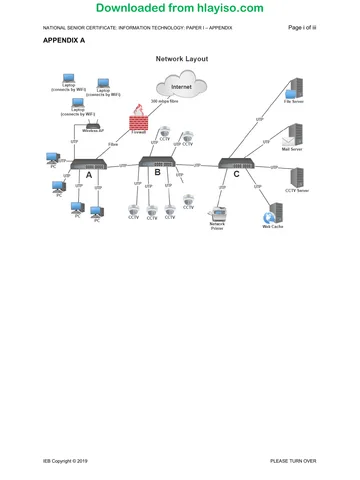
4.1 Switch (Only answer – NOT router, hub)
4.2 4.2.1 Firewall: The purpose of a firewall is to control what traffic is allowed
to traverse from one side of a network to the other, i.e. from the
external side of the network to the internal side. Important parts are:
un-authorised access, controlling traffic, preventing threats, blocking
ports. Not only threats. Must mention network for second mark.
4.2.2 Web cache: A web cache is a temporary storage (caching) of web
documents, such as HTML pages and images, to reduce response
time.
4.2.3
Threat Yes / No Reason
URL blocking Yes Firewall is able to
inspect the URL of
every incoming
webpage.
Hardware theft No Firewall cannot
prevent someone
from physically
picking up a piece of
hardware.
Denial of service attack Yes/No Firewall can be set to
detect suspiciously
large volumes of
traffic which could
cause a DOS attack
and raise an alert.
4.2.4 Similarity: both keep copies of web document; both assist with
speeding up access.
Difference: web cache is network-wide; disk cache is local to a
machine.
4.3 4.3.1 Advantages: Easy to set up and maintain; one connection failing
doesn't affect the rest of the network; easy to diagnose problems;
easy to extend.
Disadvantages: Switches can be expensive; switch is a single point
of failure; lots of cabling required.
4.3.2 Advantages: Cheap; cost effective; easy to install and maintain;
commonly used so lots of support.
Disadvantages: Easy to eavesdrop; only supports short distances
and slower speeds (must compare to fibre) (but can get over 1 GBs
now!); EMI interference; crosstalk.
IEB Copyright © 2019 PLEASE TURN OVER
Downloaded from hlayiso.com
NATIONAL SENIOR CERTIFICATE: INFORMATION TECHNOLOGY: PAPER I – MARKING GUIDELINES Page 6 of 11
4.4 4.4.1 A virtualisation technique that involves partitioning a physical server
into a number of small, virtual servers with the help of virtualisation
software. One physical server with multiple instances. Also accept
multiple software instances.
4.4.2 Advantage: Fewer physical servers required; saves space in server
room. Any correct advantage with explanation. Accept multiple OS’s
running on 1 server, cost reduction, eco-friendly/energy saving,
reduction of carbon footprint, maintenance reduced.
Disadvantage: Higher spec server required, might cost more to begin
with; if the one physical server fails, all virtual servers fail. Any
correct disadvantage with explanation. Accept: Security risk – if you
hack into the one physical server, you have access to all VMs,
scalability issues/performance, but these must be specific to
resources! Need expertise to maintain the server and VMs.
QUESTION 5 APPLICATION
5.1 5.1.1 Large amounts of (video) traffic are being generated by the items
connected to B which is being fed to C where the traffic from A is also
going; connection from B to C is UTP which is slower than fibre and
might be saturated with video traffic. Any two valid reasons why.
Accept: bad network design; bottleneck, bandwidth of UTP, switch mis-
configuration, malfunctioning network card; attenuation over distance.
"A lot of devices on the network" is NOT acceptable – it is about traffic
from the devices.
5.1.2 Speed up the connection medium between B and C; change position
of B and C on the network; further segment the network with another
switch; use a bridge to connect the segments. Any two valid ways
with justifications to change the design in such a way that speed is
improved. Accept: upgrade cable but must explain fibre; move CCTV
server to B but not in conjunction with moving the swtiches; upgrade
backbone. NOT: cable link from switch A to C.
5.2 5.2.1 Loss of power meaning LASER cannot transmit down the fibre;
failure of media converters anywhere along the route; cable damage.
Accept any correct answer. Accept: Theft of cable
5.2.2 WiMAX; Satellite; Microwave. These are ideal answers. Accept WiFi,
3G/4G/5G, ADSL, LTE, VDLS, Broadband
5.3
5.3.1 To provide access to resources within Only employees at work
the organisation
5.3.2 Access to public/ global network Anyone
5.3.3 Access to resources between branch Employees + controlled
offices or allow the public access to access by public
some of their resources
Marking: one for each definition, one for each of the use and users of each
item.
IEB Copyright © 2019 PLEASE TURN OVER
Downloaded from hlayiso.com
NATIONAL SENIOR CERTIFICATE: INFORMATION TECHNOLOGY: PAPER I – MARKING GUIDELINES Page 7 of 11
5.4 5.4.1 health; clinic; health clinic, mobile clinic Any TWO valid keywords
which show that the candidate understands the purpose of keywords
and they relate to the scenario, i.e. things that people will probably
search for on a medical website. Word mobile on its own, not
acceptable
5.4.2 The search terms people use often change over time; you might
have new products/services on your website which you want users to
see; search engines change the algorithms they use for searching/
ranking websites.
5.4.3 (a) Mobile Reason must back up the choice.
Mobile: more people are using mobile devices for searching, it
is a convenient device to use, have it with them all the time,
"always on"; possible spelling errors; abbreviated word/
spelling; LBS; #tagging more likely on mobile devices
Marking: for Yes/No. for justification. If just answer Yes/No
with no justification, no mark for the Yes/No.
(b) People use different search terms when using different
platforms. E.g.: on a desktop they might search for "health
clinics Johannesburg" but on a mobile device they might
search for "where is the closest health clinic". Mobile devices
may have abbreviations or possible spelling errors due to
limited keyboard size, or autocorrect failures! Accepted
older/younger userbase for one mark. Desktop more likely to
be doing research, mobile for immediate needs. Two reasons
shown by candidate.
5.4.4 Yes (unlikely to get a No answer here!)
Voice searches are more likely to be longer strings/sentences rather
than individual words, so you will have to cater for this in your
keyword lists.
No – justification might be something like the software used for voice
searches will break the voice query down into individual words for
you. Will use the same spoken keyword that they would have typed.
Have to link the two, otherwise not accepted. VERY specific.
Marking: for Yes/No. for justification. If just answer Yes/No with no
justification, no mark for the Yes/No.
IEB Copyright © 2019 PLEASE TURN OVER
Downloaded from hlayiso.com
NATIONAL SENIOR CERTIFICATE: INFORMATION TECHNOLOGY: PAPER I – MARKING GUIDELINES Page 8 of 11
SECTION D SOCIAL IMPLICATIONS
QUESTION 6
6.1 Email; social media; blogs; online newspapers. Any two valid digital
technologies.
6.2 6.2.1 Published by a well-known medical journal; an actual doctor was
involved with the research; results showed a correlation between
vaccinations and autism. Accept links to other studies.
6.2.2 There were only 12 subjects in the research – this is a small sample
compared to millions who receive the vaccine; the doctor paid for
kids to donate blood – this sounds totally like a fake story! Only one
doctor involved with the study.
6.3 6.3.1 No (unless the patient has given consent) Accept "Yes" only if the
candidate refers to the de-identification of the data.
6.3.2 Confidential medical data may not be given away to anyone without
the consent of the patient.
6.4 Acceptable Usage Policy (AUP) Accept Privacy Policy, POPIA
6.5
Method Community Justification
1 Digital noticeboards Urban/Rural People coming to the clinic can see
at the mobile clinic notices/videos telling them the facts.
2 Printed posters/ Urban Distribute these to people in the
leaflets community explaining in simple terms
what the facts are.
3 Text messages Urban/Rural A lot of people in rural communities have
access to simple mobile phones with text
message ability.
4 Podcasts Urban These can be played while the mobile
clinic drives around the rural areas for
people to listen to; downloaded by people
in urban areas to listen to on a mobile
device.
5 Social Media sites Urban Write articles by the doctors who they see
each week and who they trust.
Marking: one for each valid method shown, one for the justification. The
community and justification columns must be marked together. Accept any
valid method: refer back to scenario which states that rural community don’t
like tech; however, some members of the community MIGHT be using
technology – scenario doesn’t say it is banned in the area.
6.6 6.6.1 Distributed processing. Accept grid computing, NOT cloud computing
6.6.2 Astronomy projects; UFO spotting. Valid options where distributed
processing is used. Lots of possible examples!
IEB Copyright © 2019 PLEASE TURN OVER
Downloaded from hlayiso.com
NATIONAL SENIOR CERTIFICATE: INFORMATION TECHNOLOGY: PAPER I – MARKING GUIDELINES Page 9 of 11
SECTION E DATA AND INFORMATION MANAGEMENT AND SOLUTION
DEVELOPMENT
QUESTION 7
7.1 7.1.1 To eliminate repeating groups; to avoid data redundancy; to avoid
data anomalies; to make queries simpler.
7.1.2 2NF: Relations are in 1NF and there are no partial dependencies
3NF: Relations are in 2NF and there are no transitive dependencies.
Don’t accept relationship diagrams/lists
7.2 7.2.1 A field in a database table which uniquely identifies each record in
the table.
7.2.2 A key made up of two or more fields. Accept "two fields"
7.2.3 PatientID ConsultID ConsultID on its own: one mark. PatientID on its
own, no mark.
7.2.4
tblPatients tblConsultations
PatientID ConsultID
Surname Date
FirstNames Duration
ConsultID FollowUp
OR
tblPatients tblConsultations
PatientID ConsultID
Surname Date
FirstNames Duration
FollowUp
PatientID
Marking: for correct Primary Keys
for fields correct in each table
Foreign Key: ConsultID (Accept PatientID if it is shown in
tblConsultations)
7.2.5 A field in a table which is the primary key in another table.
IEB Copyright © 2019 PLEASE TURN OVER
Downloaded from hlayiso.com
NATIONAL SENIOR CERTIFICATE: INFORMATION TECHNOLOGY: PAPER I – MARKING GUIDELINES Page 10 of 11
QUESTION 8
8.1 Only the Patient class
8.2 8.2.1 Neither: Because the two methods have the same name but are in
unrelated classes. Have to mention "same name" as well as
"different classes" for the second and third marks. If candidate gives
"Neither" but incorrect explanation, one mark only. If candidate gives
"Method overloading" or "Method overriding" (both wrong) but has
correct explanation.
8.2.2
PATIENT
Fields
- patientID : integer
- surname : string
- firstName : string
- patientAge : integer
- medication : array [20] string
- clinicName : string
- followUp : integer : Accept string (contradiction in question)
for all private(-)
for all fields and all types correct
Methods
+ constructor (p:integer, s:string, fN:string, a:integer, m:[] string,
c:string, f:string Accept integer (Contradiction in question))
+ getClinicName : string
+ setClinicName (cn : string)
+ toString : string
for all methods public (+)
for constructor with
all parameters of constructor correct names and types
for accessor method
for mutator method with correct parameter
for correct name and type for toString()
8.2.3 Date of birth will be a better option as you will be able to calculate a
patient's age easily. If the age is stored, it will have to change every
year.
8.3 8.3.1
K F O R G D C E M B L P U
Marking allocation:
K must be before the loop
F to start the outer loop
R must be in the first loop
D, C, E correct sort order
IEB Copyright © 2019 PLEASE TURN OVER
Downloaded from hlayiso.com
NATIONAL SENIOR CERTIFICATE: INFORMATION TECHNOLOGY: PAPER I – MARKING GUIDELINES Page 11 of 11
B must be after M
L to end inner loop
P to decrement; between inner and outer loops
U to end outer loop
8.3.2 Descending order
8.4 8.4.1
runningAvg
line size temp runningAvg k count > 60? DISPLAY
1 4
2 0
3 0
4 0
5 0
6 24
6 1
8 24
9 F
5 1
6 60
7 2
8 54
9 F
5 2
6 78
7 3
8 80
9 T
10 Error
5 3
6 100
7 4
8 105
9 T
10 Error
11 25
Marking allocation: for all correct values of temp; allow 1 mark if not
all values are correct but candidate's values show a pattern/ follow
logically
for all correct values of runningAvg; allow 1 mark if the candidate's
values for runningAvg are correct based on incorrect values for temp
for k 2, 3 AND count 2, 3, 4
for T (True) in last two line 9s and Error in both line 10s; allow 1 mark if
candidate's T/T/Error might be wrong but follow his/her solution
for output value in line 11.
8.4.2 Line 8
8.4.3 It is necessary; k cannot be used as the algorithm stands as in the
first iteration you will have a division by zero.
Total: 180 marks
IEB Copyright © 2019
Study this subject
Revise the topics in this paper, then practise them question by question.
- Grade 12 Information Technology notes
CAPS revision notes with worked examples.
- Information Technology questions by topic
Past exam questions sorted by CAPS topic, with memos where available.
- All Grade 12 Information Technology past papers
Past papers by year, with memos where available.
- Grade 12 IEB past papers
More Information Technology and other subjects in this collection.
Recommended for this subject
More papers and memos for this grade and subject.
MemorandumIEB
Information Technology Grade 12 IEB Paper 1 2019 Memo (Afrikaans)
MemorandumIEB
Information Technology Grade 12 IEB Paper 2 2019 Memo
MemorandumIEB
Information Technology Grade 12 IEB Paper 2 2019 Memo (Afrikaans)
MemorandumIEB
Information Technology Grade 12 IEB Paper 1 2018 Memo
MemorandumIEB
Information Technology Grade 12 IEB Paper 2 2018 Memo
MemorandumIEB
Information Technology Grade 12 IEB Paper 1 2017 Memo
Related documents
Question paperIEB
Information Technology Grade 12 IEB Paper 1 2019 Question Paper
Question paperIEB
Information Technology Grade 12 IEB P1 2019 Question Paper (Afr)
Question paperIEB
Information Technology Grade 12 IEB Paper 1 2019 Question Paper
Question paperIEB
Information Technology Grade 12 IEB P1 2019 Question Paper (Afr)
MemorandumIEB
Information Technology Grade 12 IEB Paper 1 2016 Memo
Question paperIEB
Information Technology Grade 12 IEB Paper 2 2019 Question Paper
More from Grade 12 Information Technology
Question paperIEB
Information Technology Grade 12 IEB P2 2019 Question Paper (Afr)
Question paperIEB
Information Technology Grade 12 IEB Paper 1 2018 Question Paper
Question paperIEB
Information Technology Grade 12 IEB Paper 1 2018 Question Paper
Question paperIEB
Information Technology Grade 12 IEB Paper 2 2018 Question Paper
Question paperIEB
Information Technology Grade 12 IEB Paper 1 2017 Question Paper
Question paperIEB