
Downloaded from hlayiso.com
NATIONAL SENIOR CERTIFICATE EXAMINATION
NOVEMBER 2017
INFORMATION TECHNOLOGY: PAPER I
MARKING GUIDELINES
Time: 3 hours 180 marks
These marking guidelines are prepared for use by examiners and sub-examiners,
all of whom are required to attend a standardisation meeting to ensure that the
guidelines are consistently interpreted and applied in the marking of candidates'
scripts.
The IEB will not enter into any discussions or correspondence about any marking
guidelines. It is acknowledged that there may be different views about some
matters of emphasis or detail in the guidelines. It is also recognised that,
without the benefit of attendance at a standardisation meeting, there may be
different interpretations of the application of the marking guidelines.
IEB Copyright © 2017 PLEASE TURN OVER
Skip to contentMemorandum 
View all
Information Technology Grade 12 IEB Paper 1 2017 Memo
IEB Grade 12 Information Technology Paper 1 memorandum from the 2017, 14 pages. Read online or get the free PDF download, question paper linked when available.
Publisher: IEB
Information Technology · Grade 12 · 2017. Memorandum. Read online or download the PDF.
- Subject
- Information Technology
- Grade
- Grade 12
- Document type
- Memorandum
- Year
- 2017
- Paper
- 1
- Publisher
- IEB
- Curriculum
- IEB
- Pages
- 14
- File size
- 262.0 KB
Loading document…
Loading document…
1 of 14
Document textSearch extracted text and jump to a page.
Downloaded from hlayiso.com
NATIONAL SENIOR CERTIFICATE: INFORMATION TECHNOLOGY: PAPER I – MARKING GUIDELINES Page 2 of 14
SECTION A SHORT QUESTIONS
QUESTION 1 DEFINITIONS
1.1 Processing technique where multiple tasks are processed on more than one
physical processor/core.
Accept: any reference to multiple cores on a single CPU
1.2 Combination of fields and methods into a class.
1.3 A publication/book made available in digital/electronic form.
1.4 A private method in an object/class A method which assists/uses another
method - one mark. Must mention private for second mark.
Do not accept: helps another method.
Accept: “not accessible outside the class” as an alternative for private.
1.5 The process of locating the non-contiguous fragments of data into which a
computer file may be divided as it is stored on a hard disk, and rearranging
the fragments and restoring them into fewer fragments or into the whole file.
Accept arranging fragments together; Accept rearrangement; Don’t accept
files. Accept improving performance for second mark. Don’t accept free up
storage.
QUESTION 2 MATCHING COLUMNS
2.1 E
2.2 O
2.3 F
2.4 H
2.5 C
2.6 P
2.7 D
2.8 L
2.9 A
2.10 M
IEB Copyright © 2017 PLEASE TURN OVER
Downloaded from hlayiso.com
NATIONAL SENIOR CERTIFICATE: INFORMATION TECHNOLOGY: PAPER I – MARKING GUIDELINES Page 3 of 14
SECTION B SYSTEM TECHNOLOGIES
3.1 Any valid device: mouse, printer, scanner, etc.
For drives, must say external; accept network card; monitor.
3.2 3.2.1 There are more USB 2.0 devices in common use than 3.0; rather use
a 2.0 device in a 2.0 port to not take a 3.0 port away from a 3.0
device. USB 2.0 is for legacy devices. ANY ONE. Accept backwards
compatibility; cheaper to manufacture on motherboard.
3.2.2 Mouse doesn't transfer a lot of data, no need for higher-speed
connection. ANY ONE.
3.3 3.3.1 Linux suitable for servers in terms of resource allocation, lighter
demands compared to other OS, cost. ANY ONE. Accept Free;
adaptable. Don’t accept “easy to use”
3.3.2
Linux Windows
Open source, some Propriety licence
versions free, others purchased, licence
Licencing
paid for. key, 1 per PC.
Accept copyleft ; GNU Accept copyright
Mostly via online Support via Microsoft
community. Purchased either online or phone.
versions come with
User support
some support.
No official support, no
vendor support
3.4 3.4.1 Available slots on the motherboard and size of RAM chips available;
ability of motherboard components to address more RAM, bus design
and size. ANY ONE
Accept size of FSB/A address bus/bus in general; number of RAM
slots.
3.4.2 264 One mark for base (2) and one mark for exponent (64).
Accept 1.87447 X 10¹⁹
3.4.3 Multiply by 8
3.5 3.5.1 The network card can transfer data at any one of the three
transmission speeds: 10, 100 or 1000 Mb/s. Bandwidth
3.5.2 The network card can have either a UTP or fibre cable connection.
Accept STP in place of UTP, Coax.
3.6 3.6.1 SRAM Accept Static RAM
3.6.2 Cache stores copies of data and instructions from frequently used
memory locations in a bid to improve processing speed and
efficiency.
IEB Copyright © 2017 PLEASE TURN OVER
Downloaded from hlayiso.com
NATIONAL SENIOR CERTIFICATE: INFORMATION TECHNOLOGY: PAPER I – MARKING GUIDELINES Page 4 of 14
Accept: A type of memory located close to CPU, in CPU.
Accept pre/post data
Any 2 functions of cache
Don’t accept SRAM
3.7 Advantage: no need for additional I/O cards. faster Do not
Disadvantage: uses main system resources. slower accept
Accept can’t upgrade graphics card; not modular; extra cost both
IEB Copyright © 2017 PLEASE TURN OVER
Downloaded from hlayiso.com
NATIONAL SENIOR CERTIFICATE: INFORMATION TECHNOLOGY: PAPER I – MARKING GUIDELINES Page 5 of 14
3.8 3.8.1 Multithreading: will allow or multiple threads/processes of programs
to be executed simultaneously giving the end user greater
performance benefits when using software designed to take
advantage of the technology. Do not accept examples
OR a single program can run multiple threads at the same time, e.g.
downloading a file in Chrome and searching in 2 tabs.
Hyper-threading: will allow for more efficient use of the processor
resources by simulating additional execution units and thus allowing
for greater CPU utilization, fewer lags for users. However, it does not
offer performance improvements in all applications.
OR TWO sets of registers/logical processors on the CPU to enable
fast context switching.
3.8.2 Peter and Sam could be updating Facebook while printing invoices
and sending emails. One mark for two things running, second mark
must imply understanding of multithreading and hyper-threading.
Concept of one app, two things. Don’t accept faster.
3.9 3.9.1 Amount of HDD type and Operating
CPU Type
RAM capacity System
(a) (b) (b) (a)
Mark 3.9.1 and 3.9.2 together. Accept alternative answers if
sufficiently justified in 3.9.2.
Excessive options (eg: i7, 12GB RAM) must be justified by 3.9.2.
Mark 3.9.2 first to assess reasoning, then come back to mark 3.9.1
3.9.2 CPU Type:
• The number/type of applications guests will be running – not
demanding therefore i3 is probably most appropriate.
• i5 processor should be acceptable. -
• i7 – difficult to motivate in this scenario.
RAM:
• Accept 4 GB as most suitable answer – unlikely to be running
multiple large applications at once; one user at a time.
HDD:
• 1 TB most suitable from cost perspective as a guest machine,
sufficient space for guests to download photos.
• SSD quite small for the task.
Operating system:
• Windows 10 or similar recent version – guests are used to using.
• Accept Mac OS – overseas guests might be more used to using
this.
Do not accept Linux
One mark each.
If chose high specs (processor or HDD/SSD) – justify with video
editing, upload to Facebook, etc
IEB Copyright © 2017 PLEASE TURN OVER
Downloaded from hlayiso.com
NATIONAL SENIOR CERTIFICATE: INFORMATION TECHNOLOGY: PAPER I – MARKING GUIDELINES Page 6 of 14
3.10 InkJet printer – there will be SMALL but REGULAR print volumes, fairly
cheap to purchase in the first instance, can get colour printer for reasonable
cost in case visitors want that facility.
OR
Colour laser – high quality for photos lower replacement cost for cartridges
Any correct, reasonable answer related to scenario.
Accept: B&W LASER Wireless printer; Photo printer
Don’t accept “easier to use”
3.11 Medium – probably an external HDD or USB memory stick; could back up to
DVD of Blu-ray. Accept NAS/SAN; accept cloud; accept google drive,
dropbox; similar options.
Don’t accept “the Internet” unless answer clearly shows this is as a
mechanism to store.
Location – best to not be in the same room as the server. Maybe do
backups and keep the drive somewhere else; Cloud is another option.
Backup schedule – minimum of once per day, morning and evening would
be better; as data storage needs increase, might need to change to 4 hourly
or continuously, particularly if database data is stored.
OR
Alternative: could use a cloud-based back-up system: located off site, large
HDD pool used, usually back up once a day.
Other factors/options: Accept: A brand of cloud service (NOT “Google”);
Accept UPS – backups will fail if power is out; Differential/Incremental
IEB Copyright © 2017 PLEASE TURN OVER
Downloaded from hlayiso.com
NATIONAL SENIOR CERTIFICATE: INFORMATION TECHNOLOGY: PAPER I – MARKING GUIDELINES Page 7 of 14
SECTION C INTERNET AND COMMUNICATION TECHNOLOGIES
QUESTION 4
4.1 4.1.1 Wireless AP: hardware device that allows various devices to connect
to a network. Accept connect to a LAN. Don’t accept connect to
Internet.
4.1.2 Network topology: the physical or logical layout or arrangement of a
network. Accept Arrangement of computers.
4.2 4.2.1 Encryption: a security process to ensure that data being transmitted
over a wireless network is difficult to read.
OR conversion of data to unreadable form. ANY TWO
4.2.2 Very short key – usually 40 bit but up to 256 bit is supported. Key can
very easily be broken allowing for data to be decrypted. WEP relies
on a single shared key for users, leads to weakness of system. Even
the longer key sizes are still vulnerable to a number of security
problems.
Security flaws. ANY TWO.
Accept: Symetric Cryptography -> leads to a shared key = weakness.
(WEP uses RC4 and CRC32)
4.2.3 (a) 256 bits
(b) Stronger data protection network access control
ANY TWO.
4.3 4.3.1 An unique identifier assigned to a network interface used in network
communications.
4.3.2 An identifier assigned to each node on a TCP/IP network to locate
and identify the node. Accept an example such as 125.0.16.3
4.3.3 (a) Because the pool of available IPv4 addresses was too small
for the needs of IP addressing.
OR Ran out of IPv4 addresses.
(b) IPv4 − > 32 bits
IPv6 − > 128 bits
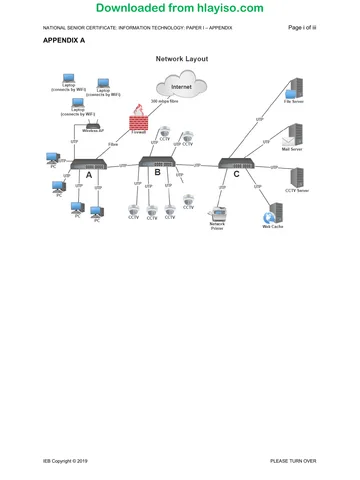
4.4 4.4.1 Option 1 – UTP
Option 2 – Fibre
Option 3 – Wi-Fi
Accept STP, radio waves, microwave
IEB Copyright © 2017 PLEASE TURN OVER
Downloaded from hlayiso.com
NATIONAL SENIOR CERTIFICATE: INFORMATION TECHNOLOGY: PAPER I – MARKING GUIDELINES Page 8 of 14
4.4.2 Option 1 – UTP: − > good if less than 100 m apart, cheap medium,
would need to be underground – costly underground installation,
susceptible to lightning.
Option 2 – Fibre: − > no distance limitations, additional equipment at
each end to convert back to UTP, no lightning issues.
Option 3 – Wi-Fi: − > distance limited but can repeat, simple to
install, lower installation costs, unsightly transmitters, affected by
weather conditions. ANY TWO.
Mark this question in relation to 4.4.1 for each Advantage/
Disadvantage.
4.5 4.5.1 A system where live video is streamed over the Internet
Accept over network; choice from catalogue supplied by B&B;
whenever guests want to watch.
4.5.2 UDP
4.5.3 • Lower bandwidth utilization than, say TCP;
• great for a use where it doesn't matter if some packets get lost;
• latency is lower so applications that need low latency survive
better. ANY TWO
4.6 4.6.1 ADVANTAGES
• They have easy control over the site;
• can make it available locally on their network even if the Internet
link is down;
• no additional hosting costs. ANY TWO
DISADVANTAGES
• Will possibly make the server open to attack;
• website could be "down" if power is off or connectivity is down –
potential bookings lost;
• need to be skilled in making updates.
• Space on server may be limited. ANY TWO
REASONS – not cheaper/faster
4.6.2 (a) To monitor incoming and outgoing packets in order to block
traffic that might come from an untrusted source.
Accept: to filter content
(b) Yes.
• As soon as there is web traffic coming to the machine from
outside there is a chance of an attack to the website;
• additionally the server could be attacked and made a
sender of spam blocking their external IP address – people
won't be able to communicate with them, could launch an
attack against the server itself, stealing data.
Really convincing for a “No” answer!
4.7 4.7.1 HTTPS Accept: SSL Don’t accept TCP
4.7.2 Digital Certificate
Don’t accept “certificate”; “s” at the end of http
IEB Copyright © 2017 PLEASE TURN OVER
Downloaded from hlayiso.com
NATIONAL SENIOR CERTIFICATE: INFORMATION TECHNOLOGY: PAPER I – MARKING GUIDELINES Page 9 of 14
4.7.3 (a) Server-side: a technique used when developing web pages where
scripts are run on a web server to produce a response for each client
request to the website. Client-side: the same as server-side scripting
except the scripts runs in the client's browser, not on the server. The
processing thus takes place at the client side. Must show
understanding of Remote vs Local.
(b) Client-side
4.8 4.8.1 A hardware (or software) technique whereby data is replicated over
multiple drives to ensure data redundancy in the event of hardware
failure. *Must mention hardware failure. Accept copy of data.
4.8.2 (a) RAID 1: 2 hard drives RAID controller installed. Provided they
are not using more than 4 TB of storage space, no upgrade
needed.
(b) I would recommend RAID 1: drive mirroring should be adequate
in this scenario. Decrease in performance from RAID 1
shouldn't be an issue for a small processing environment.
Accept RAID 5 provided they show they understand. One
mark for choice, one for reason
4.9 Accept any option: Google Apps/iCloud/AWS/Office 365
Accept SAAS. Do not accept: Gmail.
Acceptable factors: look at up-time; storage limitations; what is provided
free, what is an extra cost; level of integration between apps
IEB Copyright © 2017 PLEASE TURN OVER
Downloaded from hlayiso.com
NATIONAL SENIOR CERTIFICATE: INFORMATION TECHNOLOGY: PAPER I – MARKING GUIDELINES Page 10 of 14
SECTION D SOCIAL IMPLICATIONS
QUESTION 5
5.1 Facebook; Twitter; Instagram; blog; register with travel services such as
Booking.com/TripAdvisor; Develop an App; SEO; Airbnb.
ANY THREE
5.2 5.2.1 The firewall will only check incoming and outgoing traffic – will not
check what is happening on, say, the guest computer that could be
infected by a virus, which could then cripple the entire network.
5.2.2 No. An email message will not be checked by the anti-virus.
5.2.3 Twice daily, daily at the least. There are a lot of new threats coming
out on a daily basis – need to be kept up to date. In a time where
there is an escalated threat level, raise the number of times per day.
Accept anything which suggests this must happen often, eg: As often
as possible.
5.2.4 There are frequent updates to operating systems and other
applications, which either add new functionality or patch security
flaws. They should keep operating systems and applications up to
date in order to ensure they are not vulnerable. Accept Driver
updates.
5.3 5.3.1 Junk Mail OR SPAM Accept: Intentional very regular mail shot
5.3.2 ANY ONE
• Check the header information of the email for detail about the
sender;
• phone The B&B and ask them; reply to an email but before
sending it, hover over the TO field and look at the email address,
which is shown in the mail client embedded in the name.
Accept: Digital Signature; match email address
5.4 5.4.1 It is illegal to give personal information to third parties without their
consent;
OR: The B&B want to maintain good relations with their clients so
don't want them to be spammed/receive SMSs.
MUST have concept of illegality for second mark
5.4.2 Police investigation/criminal.
IEB Copyright © 2017 PLEASE TURN OVER
Downloaded from hlayiso.com
NATIONAL SENIOR CERTIFICATE: INFORMATION TECHNOLOGY: PAPER I – MARKING GUIDELINES Page 11 of 14
SECTION E DATA AND INFORMATION MANAGEMENT AND SOLUTION
DEVELOPMENT
6.1 Accuracy: data must be accurate to be of any processing use. A batch of
inaccurate data will skew statistics or analysis.
Consistency: having data that is not consistent from one period to another
will lead to inaccuracies in reporting.
Timeliness: data that is out of date is of no use to draw conclusions about
current trends.
Completeness: a data set with missing data cannot give an accurate picture
or position when analysed. ANY TWO.
Accept Validity/currency/relevance/correctness/reliability
6.2 6.2.1 SQL Injection Accept Injection
6.2.2 To effectively produce a list of all account numbers and associated
balances. Will always return true = one mark.
6.3 6.3.1 Credit card transactions; social networking profiles; activity generated
data (internet of things items); legacy data; media; machine-logged
data; data uploaded to public websites.
ANY THREE
Accept Cookies; Google
6.3.2 Similar purchasing: they will look at the sort of things you have
bought historically from them and suggest to you new items you
might like to buy that are similar. For example, new DVDs which have
a similar theme to those you bought before.
Birthdays: if they have access to public information which includes
information about people from your social networking profiles they
can remind you to get a gift for a friend when their birthday is coming
up; they can then look at the sort of things that person has bought
from them in the past (if they have a shopping history) and suggest
the type of gift you might like to buy your friend.
New recommendations: if you have a fitness device that is supplying
data which can be accessed publically and can be linked to you, they
might offer you items of sports clothing related to your activity.
Spending trends: they can see when you generally spend more
money than at other times in a year and make sure they contact you
more frequently at that time of the year with offers.
ANY TWO. One mark for naming and one mark for explanation for
each answer.
IEB Copyright © 2017 PLEASE TURN OVER
Downloaded from hlayiso.com
NATIONAL SENIOR CERTIFICATE: INFORMATION TECHNOLOGY: PAPER I – MARKING GUIDELINES Page 12 of 14
6.4
Field Name Data Type
Guest Name String
Number (Integer) or String
GuestID
Accept: Auto Number
Reservation Start date Date/Time
Reservation End date Date/Time
Room Number Number (Integer)
Room Capacity Number (Integer)
Room Rate Currency
Booking Reference String
Bold items have been given to candidates.
Mark allocation: 1 mark each, 1 mark for both the date fields.
6.5 In order to work out duration of stays; to be able to see when rooms are
booked/available.
6.6
Option 1:
Bookings (BookingRef; GuestID; StartDate; EndDate)
Rooms (RoomNumber; RoomCapacity; Rate BookingRef)
Guests (GuestID, GuestName)
Option 2
Bookings (BookingRef; GuestID; StartDate; EndDate RoomNumber)
Rooms (RoomNumber; RoomCapacity; Rate)
Guests (GuestID, GuestName)
6.7 Partial – field is dependent on part of a composite key.
Transitive – field is dependent on a non-key field.
Do not accept full dependency
IEB Copyright © 2017 PLEASE TURN OVER
Downloaded from hlayiso.com
NATIONAL SENIOR CERTIFICATE: INFORMATION TECHNOLOGY: PAPER I – MARKING GUIDELINES Page 13 of 14
QUESTION 7
7.1 7.1.1 It improves the algorithm by stopping the sort once the array has
been sorted.
If function of while loop vs for loop functionality discussed generally –
one mark
If candidate explains in terms of this algorithm, i.e. WHY; no more
swaps will take place – second mark
7.1.2 TRUE.
7.2 method searchStop (int inValue) for parameter
i←0
flag ← false
size ← size of valArr for all declarations
pos ← –1
while ( i < size AND flag = false )
if (inValue = valArr[i])
flag ← true
pos ← i for both assignments
end if
i←i+1
end while
return pos
Variable names must be the same as in question:
deduct one mark once for errors
Does not terminate when found but code is correct – minus two marks
Deduct 2 marks if Java or Delphi code is written
For loop and force an exit – minus two marks
Summary:
Header/parameter
Variables needed are shown and initialised
Correct loop
Correct test / assignment / increment
Correct return
IEB Copyright © 2017 PLEASE TURN OVER
Downloaded from hlayiso.com
NATIONAL SENIOR CERTIFICATE: INFORMATION TECHNOLOGY: PAPER I – MARKING GUIDELINES Page 14 of 14
7.3 Booking
Properties
− String name
− String startdate
− String enddate
Methods
+ Constructor(String n, String sd, String ed)
+ getName(): String
+ getStartDate(): String
+ getEndDate(): String
+ setName(na: String)
+ setStartDate(sdt: String)
+ setEndDate(edt: String)
+ calcDuration(): Integer
+ toString(): String
Mark allocation:
One mark for name of class
One mark to show all properties as private
One mark for methods to be shown as public
One mark for properties correctly named and typed
Accept any number of properties entered. Some candidates might use all
the properties from Q 6.4.
Two marks for correct constructor with correct number of parameters
Accept constructor name as Booking ; Ignore types here
One mark for a correct getter and a correct setter
One mark for the toString() method with correct type
One mark for the calcDuration method: correctly named and typed.
Total: 180 marks
IEB Copyright © 2017
Study this subject
Revise the topics in this paper, then practise them question by question.
- Grade 12 Information Technology notes
CAPS revision notes with worked examples.
- Information Technology questions by topic
Past exam questions sorted by CAPS topic, with memos where available.
- All Grade 12 Information Technology past papers
Past papers by year, with memos where available.
- Grade 12 IEB past papers
More Information Technology and other subjects in this collection.
Recommended for this subject
More papers and memos for this grade and subject.
MemorandumIEB
Information Technology Grade 12 IEB Paper 1 2019 Memo
MemorandumIEB
Information Technology Grade 12 IEB Paper 1 2019 Memo (Afrikaans)
MemorandumIEB
Information Technology Grade 12 IEB Paper 2 2019 Memo
MemorandumIEB
Information Technology Grade 12 IEB Paper 2 2019 Memo (Afrikaans)
MemorandumIEB
Information Technology Grade 12 IEB Paper 1 2018 Memo
MemorandumIEB
Information Technology Grade 12 IEB Paper 2 2018 Memo
Related documents
Question paperIEB
Information Technology Grade 12 IEB Paper 1 2017 Question Paper
MemorandumIEB
Information Technology Grade 12 IEB Paper 2 2017 Memo
MemorandumIEB
Information Technology Grade 12 IEB Paper 1 2016 Memo
Question paperIEB
Information Technology Grade 12 IEB Paper 2 2017 Question Paper
Question paperIEB
Information Technology Grade 12 IEB Paper 2 2017 Question Paper
Question paperIEB
Information Technology Grade 12 IEB Paper 1 2019 Question Paper
More from Grade 12 Information Technology
Question paperIEB
Information Technology Grade 12 IEB P1 2019 Question Paper (Afr)
Question paperIEB
Information Technology Grade 12 IEB Paper 1 2019 Question Paper
Question paperIEB
Information Technology Grade 12 IEB P1 2019 Question Paper (Afr)
Question paperIEB
Information Technology Grade 12 IEB Paper 2 2019 Question Paper
Question paperIEB
Information Technology Grade 12 IEB P2 2019 Question Paper (Afr)
Question paperIEB