
Downloaded from hlayiso.com
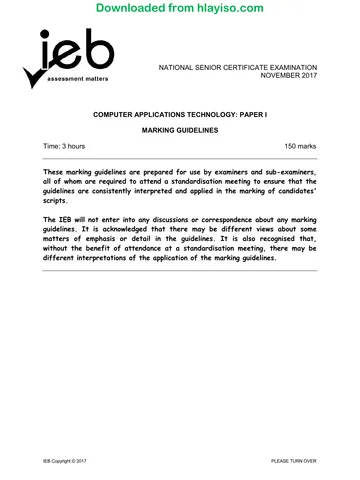
NATIONAL SENIOR CERTIFICATE EXAMINATION
NOVEMBER 2018
COMPUTER APPLICATIONS TECHNOLOGY: PAPER I
MARKING GUIDELINES
Time: 3 hours 150 marks
These marking guidelines are prepared for use by examiners and sub-examiners,
all of whom are required to attend a standardisation meeting to ensure that the
guidelines are consistently interpreted and applied in the marking of candidates'
scripts.
The IEB will not enter into any discussions or correspondence about any marking
guidelines. It is acknowledged that there may be different views about some
matters of emphasis or detail in the guidelines. It is also recognised that,
without the benefit of attendance at a standardisation meeting, there may be
different interpretations of the application of the marking guidelines.
IEB Copyright © 2018 PLEASE TURN OVER
Skip to contentMemorandum 
View all
Computer Applications Technology Grade 12 IEB Paper 1 2018 Memo
IEB Grade 12 Computer Applications Technology Paper 1 memorandum from the 2018, 16 pages. Read online or get the free PDF download, question paper linked when available.
Publisher: IEB
Computer Applications Technology · Grade 12 · 2018. Memorandum, 16 pages. Read online or download the PDF.
- Subject
- Computer Applications Technology
- Grade
- Grade 12
- Document type
- Memorandum
- Year
- 2018
- Paper
- 1
- Publisher
- IEB
- Curriculum
- IEB
- Pages
- 16
- File size
- 197.5 KB
Loading document…
Loading document…
1 of 16
Document textSearch extracted text and jump to a page.
Downloaded from hlayiso.com
NATIONAL SENIOR CERTIFICATE: COMPUTER APPLICATIONS TECHNOLOGY: PAPER I – Page 2 of 16
MARKING GUIDELINES
SECTION A
QUESTION 1
1.1 1.1.1 Cookie
1.1.2 "Hot" swapping
1.1.3 Windows Explorer
1.1.4 Apps
1.1.5 Clock speed
1.2 1.2.1 B
1.2.2 C
1.2.3 A
1.2.4 C
1.2.5 D
1.2.6 B
1.2.7 D
1.2.8 A
1.2.9 B
1.2.10 C
QUESTION 2
2.1 2.1.1 hacker
2.1.2 bandwidth
2.1.3 Validation rule
2.1.4 SUMIF()
2.1.5 Utility software
2.1.6 Cc
IEB Copyright © 2018 PLEASE TURN OVER
Downloaded from hlayiso.com
NATIONAL SENIOR CERTIFICATE: COMPUTER APPLICATIONS TECHNOLOGY: PAPER I – Page 3 of 16
MARKING GUIDELINES
2.2 2.2.1 Metadata: Data that tells you about the properties of the file, i.e.
author OR Data to better identify the file when searched for on the
hard drive. OR Data about the data can be accepted if the learner
gives an explanation of what they mean, i.e. they explain that it is
data about the data in the file.
2.2.2 CAPTCHA: A test to determine whether it is a human being
interacting with the computer OR It takes the form of distorted
letters and words that only humans can recognise and enter.
2.2.3 BIOS: The BIOS contains all the codes required to control the
keyboard, drivers, monitor and many other functions OR Basic Input
Output System OR loads the full operating system OR executes
Power On Self Test.
2.2.4 Product key: The product key is a series of alphanumeric
characters that is entered by the user during the installation of
computer software to verify if the program is legal OR The product
key ensures that there is no software piracy by controlling how
many times software is loaded onto a device by referring to the
number of users who entered the key.
IEB Copyright © 2018 PLEASE TURN OVER
Downloaded from hlayiso.com
NATIONAL SENIOR CERTIFICATE: COMPUTER APPLICATIONS TECHNOLOGY: PAPER I – Page 4 of 16
MARKING GUIDELINES
SECTION B
QUESTION 3 SYSTEM TECHNOLOGIES
Question Name of Item/Device Main Function
Number
3.1.1 Android Operating System or Software that controls all the activities that
android device(phone) OR take place on a mobile device.
Android OR
NOT just smartphone It is software that could be referred to as the
however if this was used then platform as it controls and supports all the
function can still be correct other software and hardware of a mobile
device.
OR
When a mobile device is switched on, the
operating system must first be loaded to
control all the activities.
If phone need to reflect a phone's function
anything a phone can do
3.1.2 Network Interface Card (NIC) Allows communications to take place on a
Or Ethernet Port Or Lan Port network.
OR
Not router Contains a port for a wired device that is
needed to connect to a network.
OR
Circuitry built onto the motherboard that
allows devices to connect to a network.
3.1.3 Fingerprint Scanner Technology that measures something
OR biologically unique to you such as your finger-
Biometric Scanner print to give you access to hardware or
software.
OR
Fingerprint scanners that are in new laptops/
smartphone that cannot be accessed without
fingerprint authorisation.
3.1.4 Quick Response Code It is a code designed to allow you to quickly
(QR Code) obtain and enter longer text such as a web
address simply by using the camera on your
mobile device.
OR
It is a code that usually opens a webpage with
more information on the item being scanned.
OR
A machine-readable code consisting of an
array of black and white squares, typically
used for storing URLs or other information for
reading by the camera or an app on a
smartphone.
IEB Copyright © 2018 PLEASE TURN OVER
Downloaded from hlayiso.com
NATIONAL SENIOR CERTIFICATE: COMPUTER APPLICATIONS TECHNOLOGY: PAPER I – Page 5 of 16
MARKING GUIDELINES
3.2 3.2.1 HDMI
3.2.2 • It is a faster connection than VGA.
• It is a high-definition connection as opposed to a standard-
definition connection.
• The quality of display is better/clearer/more defined than using a
VGA connection.
• Has Audio and Video on one string
(Any ONE of the above)
3.3 3.3.1 Click on the file, right-click and choose Send to ... > zipped folder or
zip file (depending on the software that has been loaded on his/her
computer) OR open a zipping program and compress the chosen
files, be careful not just compress the software
3.3.2 Photos with a *.jpg extension (do not accept PDF as it is stated in
the question "apart from PDF") OR Image File OR multimedia file
3.4 3.4.1 RAM: Random Access Memory
If there are a number of applications or programs running and there
is insufficient memory, it can slow the overall performance of the
computer. OR The more memory you have available, the better
your computer will perform as more data and programs can be
loaded into memory for processing OR Adding RAM is often the
cheapest and most effective upgrade as it affects the processing
speed of all the programs on your computer.
(Any explanation that clearly indicates how the performance of the
computer is influenced.)
3.4.2 CPU: Central Processing Unit
In general, the higher the speed (GHz), the faster the CPU will be
OR This is the hardware component that performs all calculations
and executes instructions OR The CPU fetches instructions and
data that it needs to work on from RAM. OR having more Cores
(Any explanation that clearly indicates how the performance of the
computer is influenced.)
3.4.3 SSD: Solid State Disk/Drive
The SSD is the place where data is stored permanently and it stores
data electronically like a flash disk OR The SSD gives us fast data
transfer speeds and it therefore makes sense that faster secondary
storage can improve the overall performance of a computer system
OR The size of your SSD is important due to all the programs that
need to be stored on the SSD and is normally measured in GB/TB,
etc. OR This is digital secondary storage that makes the process
faster.
(Any explanation that clearly indicates how the performance of the
computer is influenced.)
IEB Copyright © 2018 PLEASE TURN OVER
Downloaded from hlayiso.com
NATIONAL SENIOR CERTIFICATE: COMPUTER APPLICATIONS TECHNOLOGY: PAPER I – Page 6 of 16
MARKING GUIDELINES
3.5 Archiving
Explanation
• To have information saved on a secondary system such as DVD for
record and referral purposes when needed.
OR
• This is to store data/files that are not going to be used on a daily basis.
OR
• This is a process where you store files that are not going to change or
be used in the near future and move them to another system to free up
current disk space.
• Compress and save the Archive on the same drive then free up disk
space.
Example
• A company can make copies of their financial reports from the last five
years as they are not likely to refer to them again once tax returns are
done.
OR
• A school can keep records of Gr 12 data for a few years for any queries
the school may have.
(Any explanation with an example that will refer to keeping records in a
safe place for referral purposes only, not for making any changes to the
data/files.)
Backup
Explanation
• This is to keep a copy/duplicate of data/files in case something goes
wrong where data/files can become corrupted/overwritten.
OR
• This is to keep a copy/duplicate of data/files in case your data/files are
deleted.
Example
• When working on a school assignment, keep a copy in case your
computer should crash.
OR
• Teacher can keep a record of learners' marks for the year and as the
year goes on data can be added to previous work. Also this is a safety
measure to have results should the data get lost.
(Any explanation with an example that will refer to keeping a copy/
duplicate of data/files.)
IEB Copyright © 2018 PLEASE TURN OVER
Downloaded from hlayiso.com
NATIONAL SENIOR CERTIFICATE: COMPUTER APPLICATIONS TECHNOLOGY: PAPER I – Page 7 of 16
MARKING GUIDELINES
QUESTION 4 INTERNET AND NETWORK TECHNOLOGIES
4.1 4.1.1 • Communication software
• Dial-up software
• Software to connect to the internet
• Web browser
• Emailing program
• Instant messenger
• Operating system with networking software
• Networking software
(Any ONE reasonable answer NO BRAND NAMES)
4.1.2 • Modem
• Wi-Fi Router/Router
• 3G/4G Connection – Dongle
• Fibre cable + router
• NIC
(Any ONE reasonable answer)
4.2 4.2.1 • Fewer cables.
• More people can be connected to a wireless network.
• Employees can connect anywhere in the company while walking
around.
• Employees are not confined to one desk.
(Any ONE reasonable answer)
4.2.2 • Transmitting can be slow.
• Signal could be blocked that causes communication to fail.
• Range could be limited.
• Have to make sure that all laptops are wireless enabled.
• Security not in place other can piggyback on the network
(Any ONE reasonable answer to do with a wireless connection)
4.3 YES (generally looking for advantages when yes)
• The software is always up to date.
• You don't have to download or install any costly/paid-for applications or
software to access the resources.
• Access data from any computer or mobile device anywhere as long as
you have internet connection.
• Does not use space on local computer.
• Sharing of documents with other employees who can work collaboratively
on the same document at the same time.
• Documents are automatically backed up by the system.
(Any TWO of the above answers)
IEB Copyright © 2018 PLEASE TURN OVER
Downloaded from hlayiso.com
NATIONAL SENIOR CERTIFICATE: COMPUTER APPLICATIONS TECHNOLOGY: PAPER I – Page 8 of 16
MARKING GUIDELINES
NO (Generally looking for disadvantages when answer is no)
• Cloud computing can only be used effectively if you have a fast, reliable
internet connection.
• The organisation will not have control over security of data or backup
policy.
• Monthly fee may have to be paid to make use of the services or to get
access to the resources.
• Software may not have all the features or capabilities required by the
organisation.
• Cloud computing might be slower as it is dependent on the internet
connection.
(Any TWO of the above answers)
4.4 4.4.1 • Files/data will be uploaded to an online site.
• The employees will receive a link or password for the relevant
files/data.
• This link will then be used to download the files to work on.
(Answer must include uploading/use of password – sign into
account – to access/ download to receive full marks.)
4.4.2 filegooi, Google Drive, Dropbox, Microsoft OneDrive, iCloud
4.5 4.5.1 Internet Service Provider
4.5.2 • Email
• Webpage hosting
• Spam filtering
• Fax-to-Email
• Technical support
• Voice services/Skype
• Landline services
(Any THREE of the above answers)
4.5.3 Shaped connections means that preference is given to certain
services on the internet such as email, downloading and browsing.
Other services, such as online gaming and VoIP, are given a lower
priority and are therefore slower.
IEB Copyright © 2018 PLEASE TURN OVER
Downloaded from hlayiso.com
NATIONAL SENIOR CERTIFICATE: COMPUTER APPLICATIONS TECHNOLOGY: PAPER I – Page 9 of 16
MARKING GUIDELINES
QUESTION 5 INFORMATION MANAGEMENT
5.1 5.1.1 • Shower
• Laundry machine/Washing machine
• Dishwasher
• Irrigation
• Topping up of your pool water
• Toilet flushes
• Use of basin water/kitchen sink water
• Geyser
(Any ONE of the above answers)
5.1.2 • Has a garden hose been left on and water is being wasted?
• Has your household exceeded its water usage for the day, week
or month?
• A running toilet.
• You could have a burst pipe.
• Maybe a tap in your house is dripping.
• Irrigation pipe is leaking.
• Someone going over 90-second shower limit.
• If saying you get an email/sms, etc. that say you have a leak,
gone over the limit etc. must justify the notification being specific
on assisting in saving water
(Any TWO of the above answers)
5.2 • How many loads of laundry you are doing weekly.
• The length of showers you take.
• The water used to irrigate your garden or fill your pool.
• How long you leave a tap open when brushing your teeth.
• How much water you use when washing dishes.
• How much water your household uses daily.
(Any TWO answers that can identify where the most water is used in the
household can be accepted. Must be different from 5.1.2)
5.3 • Has the total household water usage exceeded 50 litres per person per
day?
• Has the total household water usage exceeded 10 500 litres per month?
• Will the household have to pay a fine for excessive water use?
(Any TWO of the above answers)
IEB Copyright © 2018 PLEASE TURN OVER
Downloaded from hlayiso.com
NATIONAL SENIOR CERTIFICATE: COMPUTER APPLICATIONS TECHNOLOGY: PAPER I – Page 10 of 16
MARKING GUIDELINES
5.4 5.4.1 Excel Spreadsheets OR Access Databases. Cross out the brand
name if preceding the software.
5.4.2 Spreadsheets:
• You can draw up graphs to compare previous months' with
current month's use of water.
• You can do calculations to work out the average water use of the
household appliances.
• When the City of Cape Town wants to give you a fine because in
their opinion you used too much water, you have evidence to
confirm your water usage by showing this in your spreadsheet
you created.
• You can use a rolling average to show how water was saved
over a period of time or how water was wasted.
Database
• Queries and reports can be created for weekly/daily/monthly
reports
(Any ONE of the above answers but must reflect on the program
chosen)
QUESTION 6 SOCIAL IMPLICATIONS
6.1 6.1.1 • The writer had to do excessive research by going out and finding
information whereas with digital media research is available
through websites/blogs/twitter and there is more interaction with
the readers.
• Legacy media is being replaced by digital platforms whereby
social media managers can give feedback on the connections
between the people and the data.
• Social media does better as it has an in-depth understanding of
the audience as individuals, not only demographics, and therefore
produces more in-depth content based on its target audience.
• Newspapers can now shoot video and make it part of the story
and a radio station can write blogs and use Facebook as part of
their show to interact with their audience.
(Any TWO of the above answers where the learner's focus must be
on the interaction that takes place with the new technology
from the user and the writer's perspective)
Eco friendly as long as they justified.
IEB Copyright © 2018 PLEASE TURN OVER
Downloaded from hlayiso.com
NATIONAL SENIOR CERTIFICATE: COMPUTER APPLICATIONS TECHNOLOGY: PAPER I – Page 11 of 16
MARKING GUIDELINES
6.1.2 • Take a disciplined and structured approach to dealing with
information by creating a routine that limits the time you spend
interacting with information.
• Filter emails into categories.
• Use RSS feeds to structure news you read to limit browsing the
web.
• Make use of advanced searches and good search terms to help
you find information when looking on the web.
(Any THREE of the above answers)
6.2 Social bookmarking refers to the sites the user browses often and lets other
users see what they bookmark – Save/collect/pin/store and many of these
bookmarks let you see how many times a particular site has been
bookmarked. There is no interaction between the users.
Social networking refers to sites like Facebook, Myspace, Twitter and
Instagram that are dedicated websites and applications where users
interact with other users and find people with similar interests to their own.
6.3 6.3.1 As it wants to con readers to share personal information.
6.3.2 • Whaling
• Spear phishing
• Spoofing
• Pharming
(Any ONE of the above)
IEB Copyright © 2018 PLEASE TURN OVER
Downloaded from hlayiso.com
NATIONAL SENIOR CERTIFICATE: COMPUTER APPLICATIONS TECHNOLOGY: PAPER I – Page 12 of 16
MARKING GUIDELINES
QUESTION 7 SOLUTION DEVELOPMENT
7.1 7.1.1 A heading style was not used and to fix this all you need to do is to
change all the headings in the document to any suitable heading
style and to update the table of contents.
OR
A different type of style, for example own style/subtitle, etc., was
used and to fix the table of contents you need to make sure that the
preferred style was selected in the table of contents option dialogue
box for the table of contents to work.
(Any ONE of the above)
7.1.2 Use Paste Special
Merge formatting into document which is being copied.
7.2 =IF (C3="Female", "New", "Old") - 1 if Inverted commas not use
(Do not just assume that answer is incorrect if an alternative is suggested,
for example, a VLOOKUP)
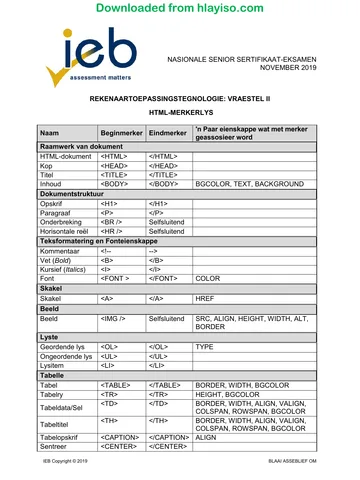
7.3 >\E L 000<LLL Must have \
7.4 <a href=https://www.JusticeLeagueLounge.com>
Visit JusticeLeagueLounge </a>
For the above answer make sure that:
• All is correct especially https (as question said it was a secure website
for the 1st mark.
• Spelling for the webpage is important for the 2nd mark.
• However, if the alternative text Visit JusticeLeagueLounge has a spelling
error, still award the 3rd mark.
• Closing the Tag is what we are looking for to award the 4th mark.
IEB Copyright © 2018 PLEASE TURN OVER
Downloaded from hlayiso.com
NATIONAL SENIOR CERTIFICATE: COMPUTER APPLICATIONS TECHNOLOGY: PAPER I – Page 13 of 16
MARKING GUIDELINES
SECTION C
QUESTION 8 INTEGRATED SCENARIO
8.1 8.1.1 It is where two or more computers are configured (No controlling
server) to allow certain files, folders and devices to be shared.
8.1.2 A cloud server allows the user to share hardware with other
customers as opposed to a dedicated server where the hardware is
only for the use of the company.
OR
Cloud server security resides on a shared virtualised environment
that is managed by your cloud-hosting provider whereas the
security of a dedicated server is hosted on physical hardware that is
solely dedicated to the company.
OR
For a cloud server the company pays an amount to use the server
space without having to pay an IT specialist to manage the server
while a company using dedicated servers needs IT capacity and
expertise to manage the ongoing maintenance and space available
on the server.
OR
A cloud server will allow you to access your resources online within
minutes anywhere at any time. A dedicated server can take some
time to access your resources as you need to connect first and if the
server is down you cannot access any data.
(There must be a clear comparison between the different servers to
award full marks.)
(Any TWO of the above)
8.2 8.2.1 Radio Frequency Identification
8.2.2 It is a small chip that stores and transmits data and it works over a
relatively short range.
OR
It is a tag with information that is activated by radio frequency
signals to communicate with a device that receives the data.
OR
Data is loaded on this card that can only be read by an RFID tag
reader when the radio frequency signal is close by for receiving of
information.
8.2.3 In the hotel environment, data about the guests can be loaded on the
card and this would then be used to gain access to their rooms.
OR
The use of the elevator.
OR
When going for breakfast, lunch or supper, they can be charged.
(Any ONE of the above)
IEB Copyright © 2018 PLEASE TURN OVER
Downloaded from hlayiso.com
NATIONAL SENIOR CERTIFICATE: COMPUTER APPLICATIONS TECHNOLOGY: PAPER I – Page 14 of 16
MARKING GUIDELINES
8.3 8.3.1 She will need to use the Search and Replace/Find and Replace
option.
8.3.2 • So you can give more detailed explanations of text in the report.
• Make comments on certain statements in the report.
• Refer to the source from which certain facts were obtained.
• Supply the name of someone who has been quoted.
• The information appears on the same page of the text that is
explained Bullet ONE alternative.
(Any THREE of the above answers)
8.3.3 • Compatible across various platforms.
• Compressed, therefore smaller when emailed.
• Layout and formatting won't change when printed.
• Can be created from any source document.
• Software to view pdf files is free.
• Secure, almost no chance of getting infected with viruses.
(Any TWO of the above answers)
8.3.4 You create your document as normal and then you can use the
Save As option that allows you to export the document as a pdf.
OR
You can use pdf creation software.
8.3.5 Portable Document Format
8.4 Hits refer to the number of people that has visited the website.
OR
The number of times there were file requests from a webserver.
8.5 8.5.1 • He can reboot his phone by turning it off and on again/reload/
refresh the app
• He needs to make sure that he downloaded the latest version of
Google Maps.
• He needs to make sure he has the latest Google Play software
downloaded.
• He can check his cache data to see if it is preventing the Google
Maps app from running.
• There may be an issue with his battery or device not being
sufficiently charged to run the app.
• The built-in GPS could be switched off to conserve power/Switch
on the GPS Location
• He could reset his device to factory settings.
• Switch on Mobile DATA
(Any TWO of the above answers)
IEB Copyright © 2018 PLEASE TURN OVER
Downloaded from hlayiso.com
NATIONAL SENIOR CERTIFICATE: COMPUTER APPLICATIONS TECHNOLOGY: PAPER I – Page 15 of 16
MARKING GUIDELINES
8.5.2 • Can record your cycling speed in km per time.
• Can record your distance cycled.
• Can record how many calories you burnt.
• Can give a graphical presentation of your performance.
• Can record your interval times.
(Any TWO of the above answers)
8.5.3 • The software on his computer is out-dated and he needs to
install a new version of the software.
• The file program might not be installed on his device.
• File could be corrupted during downloading and he needs to
download the file again.
• He needs to check if he has enough memory to open the file.
• He may not have associated the program with that file.
(Any TWO of the above answers)
8.6 8.6.1 A quad-core processor is a chip with four independent units called
cores that read and execute central processing unit instructions to
manage the data.
The Turbo boost increases the clock speed of each core individually
to get better performance out of the chip.
8.6.2 64 Gigabyte Embedded Multimedia Card
This is usually found in smartphones and 2-in-1 devices and is
another form of storage.
8.7 8.7.1 Contrast ratio is the difference between the darkest black and the
whitest white that the display can produce. The higher the contrast
ratio the clearer and sharper the image will appear.
8.7.2 Resolution is the number of horizontal and vertical pixels that a
screen can display. This will determine how many images can fit on
the screen. OR Quality blurry/better/bad of the image
8.8 2-in-1 device is …
• Versatile with a flip-screen that provides four-way flexibility viz. tablet
mode, laptop mode, stand mode and tent mode.
• More robust than a normal notebook, which means it can take a few
knocks.
• Lighter than a normal notebook.
• A good 2-in-1 device can easily perform as a smartphone/tablet/laptop,
avoiding buying many gadgets.
• A 2-in-1 device is known for its touch screen.
• Smaller in size, so easy to manage when out and about.
• If on negative side then confirm the reasons.
(Any THREE of the above answers)
IEB Copyright © 2018 PLEASE TURN OVER
Downloaded from hlayiso.com
NATIONAL SENIOR CERTIFICATE: COMPUTER APPLICATIONS TECHNOLOGY: PAPER I – Page 16 of 16
MARKING GUIDELINES
8.9 The earlier versions of Bluetooth was used in cell phones, wireless
Bluetooth headsets and Bluetooth connections found in laptop computers
where the main purpose was to transmit data (for example images, music,
etc.) using short wavelength radio transmissions.
Bluetooth 4.0 is designed primarily for devices that collect information
frequently, either as often as five times a second or just once every hour,
for example heart rate, glucose levels, number of steps walked, etc.
8.10 • Open-source software is not supported in all geographical areas.
• Some employees may not understand the technical help offered on the
internet.
• No one to hold responsible if program is not working.
• There are various versions of the same software that could have an
influence on the way work is done in the company.
• Resistance to change/comfortable with what they know.
• Not as widely used, etc.
(Do not accept generalised answers such as "not as good" or "has bugs", etc.)
(Any ONE of the above answers)
8.11 • A lot of damage could have been caused by the virus if only detected
two months after infection, etc.
• Anti-virus definitions and programs should be updated as new virus
signatures are developed every day.
• Because the employees share information, multiple users can be
affected.
• The company runs the risk of losing important data that can cause the
company to close down.
(Any TWO of the above answers)
8.12 8.12.1 • It would save time as the data would be captured immediately
(anything relating to time/money saving in this bullet)
• It would provide potentially more accurate data if the system is
suitably designed (e.g. if the system has no fields or pieces of
information missing).
• The system can be quickly adapted if there is additional data that
needs to be captured, etc.
• Can be completed any time of the day.
• Saving the environment need to be explained for example not
printing
(Any TWO of the above answers)
8.12.2 Vodcasting is video podcasting or vlogging; this is to download
video that is added to the podcast. Podcasting is just the
downloading of audio files.
8.13 Green computing refers to the use of (computer) technology in a way that is
sensitive to the environment.
Total: 150 marks
IEB Copyright © 2018
Study this subject
Revise the topics in this paper, then practise them question by question.
- Grade 12 Computer Applications Technology notes
CAPS revision notes with worked examples.
- Computer Applications Technology questions by topic
Past exam questions sorted by CAPS topic, with memos where available.
- Grade 12 Computer Applications Technology quizzes
Short topic quizzes with instant feedback.
- All Grade 12 Computer Applications Technology past papers
Past papers by year, with memos where available.
- Grade 12 IEB past papers
More Computer Applications Technology and other subjects in this collection.
Recommended for this subject
More papers and memos for this grade and subject.
MemorandumIEB
Computer Applications Technology Grade 12 IEB Paper 1 2019 Memo
MemorandumIEB
Computer Applications Technology Grade 12 IEB P1 2019 Memo (Afr)
MemorandumIEB
Computer Applications Technology Grade 12 IEB P1 2018 Memo (Afr)
MemorandumIEB
Computer Applications Technology Grade 12 IEB Paper 2 2018 Memo
MemorandumIEB
Computer Applications Technology Grade 12 IEB P2 2018 Memo (Afr)
MemorandumIEB
Computer Applications Technology Grade 12 IEB Paper 1 2017 Memo
Related documents
Question paperIEB
Computer Applications Technology Grade 12 IEB P1 2018 QP
Question paperIEB
Computer Applications Technology Grade 12 IEB P1 2018 QP (Afr)
MemorandumIEB
Computer Applications Technology Grade 12 IEB P1 2017 Memo (Afr)
Question paperIEB
Computer Applications Technology Grade 12 IEB P2 2018 QP
Question paperIEB
Computer Applications Technology Grade 12 IEB P2 2018 QP (Afr)
Question paperIEB
Computer Applications Technology Grade 12 IEB P2 2018 QP
More from Grade 12 Computer Applications Technology
Question paperIEB
Computer Applications Technology Grade 12 IEB P1 2019 QP
Question paperIEB
Computer Applications Technology Grade 12 IEB P1 2019 QP (Afr)
Question paperIEB
Computer Applications Technology Grade 12 IEB P2 2019 QP
Question paperIEB
Computer Applications Technology Grade 12 IEB P2 2019 QP (Afr)
Question paperIEB
Computer Applications Technology Grade 12 IEB P2 2019 QP
Question paperIEB