
Downloaded from hlayiso.com
NASIONALE
SENIOR SERTIFIKAAT
GRAAD 12
SEPTEMBER 2015
REKENAARTOEPASSINGSTEGNOLOGIE V1
MEMORANDUM
NAAM VAN KANDIDAAT: GRAAD:
HANDTEKENING VAN
OPVOEDER
TOTAAL V1 V2 V3 V4 V5 V6 V7
PUNTE: 180 35 15 42 8 40 22 18
Hierdie memorandum bestaan uit 11 bladsye.
Skip to contentAll 2015 papers 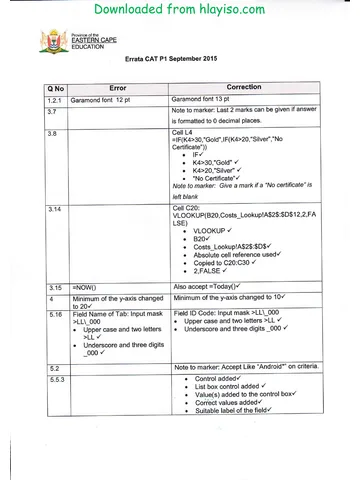
View all





Computer Applications Technology Grade 12 P1 2015 Memo (Afr)
Grade 12 Computer Applications Technology Paper 1 memorandum from the Eastern Cape Mock Exam 2015 (Afrikaans), 11 pages. Read online or download the free PDF.
Computer Applications Technology · Grade 12 · Eastern Cape Mock Exam · 2015. Memorandum, 11 pages. Read online or download the PDF.
- Subject
- Computer Applications Technology
- Grade
- Grade 12
- Document type
- Memorandum
- Year
- 2015
- Exam period
- Eastern Cape Mock Exam
- Paper
- 1
- Curriculum
- CAPS
- Pages
- 11
- File size
- 533.0 KB
Free to read online, no sign-up needed
Loading document…
Loading document…
1 of 11
This exam
Eastern Cape Mock Exam 2015
Questions in this paper
Document textSearch extracted text and jump to a page.
Downloaded from hlayiso.com
2 REKENAARTOEPASSINGSTEGNOLOGIE V1 (EC/SEPTEMBER 2015)
VRAAG 1 Lêer: Q1Newsletter_Nuusbrief
Nr. Kriteria Maks Punt
1.1 Kantlyne
1
Bo- en onderste kantlyne 1.5cm
1.2 1.2.1 Font Formatering: Opskrif ‘The cost saving”
geformateer na:
2
Garamond font
12pt.
1.2.2 Reëlspasiëring
Reëlspasiëring gestel op Exactly 2
14pt
1.2.3 Kolpuntlys
Teks onder die opskrif ‘Resource Library’ is ‘n
kolpuntlys 2
Kolpunte is geskep met die prent tablet vs
textbooks
1.3 Soek en Vervang
2 voorkomste van ‘TRAIN YOUR BRAIN’ met ‘TYB’
Vertoon in ʼn helder groen font 2
(Nota aan die merker: Totale voorkomste van TYB is 2)
1.4 Kolomme
Korrekte teks geselekteer
In drie kolomme 4
Lyn ingevoeg
Teks in kolomme is gejusteer
5.1 1.5.1 Style
Nuwe styl genaamd Lets go digital geskep
gebaseer op heading style 1 4
Geskadeerde raam rondom
Paragraaf spasiëring na 2.5 pt
1.5.2 Lets go digital styl toegepas op opskrifte wat in rooi
1
verhelder is: ‘How it all works’
Kopiereg voorbehou Blaai om asseblief
Downloaded from hlayiso.com
(EC/SEPTEMBER 2015) REKENAARTOEPASSINGSTEGNOLOGIE V1 3
1.6 Inhoudsopgawe
Bladsybreuk ingevoeg
Opskrif ‘Table of Contents’ vertoon
Formaat verander na ‘Distinctive’
Gidsstippies vertoon
TOC vlakk veraner om die korrekte volgorde te
vertoon
(Verwys na die skermkopie hieronder)
5
1.7 Watermerk
Prent watermerk ingevoeg (korrekte prent 1Chart
2
gebruik)
Skaal gestel op 150%
1.8 Bladsynommering
Onewe en Ewe bladsynommering
In die kop-/voetskrif van die dokument 5
Onewe linksen Ewe regs geplaas
Begin by nommer 10 (funksie is gebruik)
1.9 Datum 31 Maart 2001
Twee harde spasies ingevoeg
2
(een punt elk)
31°March°2001
1.10 Karakterspasiëring
Karakterspasiëring versprei (‘expanded) to 3 pt
3
Teks in hoofletters
Is regsinlyn
Totaal vir VRAAG 1: 35
Kopiereg voorbehou Blaai om asseblief
Downloaded from hlayiso.com
4 REKENAARTOEPASSINGSTEGNOLOGIE V1 (EC/SEPTEMBER 2015)
VRAAG 2 Lêer: Q2SubjectChoice_Vakkeuse
Nr. Kriteria Maks. Punt
2.1 Hiperskakel
1
Verwyder
2.2 Simbool ingevoeg
Windows simbool korrek ingevoeg tussen ‘Subject 1
Choices” en ‘Vakkeuse’
2.3 Paragraafraam
Paragraafraam ingevoeg
Slegs bo en onder rame vertoon 2
(Moenie tekshokkies, tabelle of enige ander vorms aanvaar
nie)
2.4 Aftrek vormveld ingevoeg
Aftrek vormveld vir Group 2 ingevoeg met die volgende
opsies Accounting
1
Geography
Business Studies
(Aanvaar in enige volgorde)
2.5 Merkblokkie ingevoeg
Merkblokkie ingevoeg by die Mathematics/Mathematical
Literacy opsie 2
Tabelstop op 8 cm
(Moenie verstek tabelstoppe aanvaar nie)
2.6 Eienskappe van Surname/Van veld is gestel om 10 karakters
1
te aanvaar
2.7 Tabel eienskappe
Tabel ingevoeg met 1 ry en 10 kolomme
Tabel gestel vir ‘AutoFit to contents’ 3
Ry hoogte gestel op 0.8 cm
(Aanvaar verkeerde posisie)
2.8 Lyn vir handtekening ingevoeg
Handtekening ingevoeg deur ʼn tabelstop te gebruik 2
Met enige lyn/stippie
2.9 Wagwoord
Wagwoord ‘Help’ ingevoeg 2
Redigeringsopsie: Filling in form
Totaal vir VRAAG 2: 15
Kopiereg voorbehou Blaai om asseblief
Downloaded from hlayiso.com
(EC/SEPTEMBER 2015) REKENAARTOEPASSINGSTEGNOLOGIE V1 5
VRAAG 3 Lêer: Q3Staff_Personeel
Nr. Kriteria Maks. Punt
3.1 Ry 1
1
Voeg saam en sentreer selle A1 tot P1
3.2 Selle A1 tot P1
1
Vulkleur verander na enige groen
3.3 Selle A3 tot P3
1
Opskrifte se teksrigting 90˚ hoek
3.4 Sel F12
1
Datum geformateer na dd-mmm-yy, bv. 20-Jan-80
3.5 Sel D4 = UPPER(CONCATENATE(A4,RIGHT(B4,1),’’*’’,LEFT(C4,3))))
OF
Cell D4 = UPPER(A4 & RIGHT(B4,1) &”*” & LEFT(C4,3)))
CONCATENATE of & operator
A4 6
Asterisk “*”
RIGHT(B4,1)
LEFT(C4,3)
UPPER
3.6 3.6.1 Kolomme H3 tot J3
=COUNTA(H4:H21)
COUNTA
2
H4:H21
OF
=COUNTIF (H4:H21,"Laptop")
3.6.2 Kolomme H3 tot J3
=COUNTIFS(H4:H21,"Laptop",I4:I21,"Smartphone")
COUNTIFS 3
H4:H21 Laptop
I4:I21 Smartphones
3.7 Sel K4
=ROUND(((TODAY()-G4)/365),0)
TODAY
- G4 5
/ 365 dae
ROUND
0 desimaal
3.8 Sel L4
=IF(K4>=30,"Gold",IF(K4>=20,"Silver","No Certificate "))
IF
4
K4>=30,"Gold"
K4>=20,"Silver"
"No Certificate "
3.9 Sel C22 =LEN(C16)
LEN 2
Korrekte sel C16
Kopiereg voorbehou Blaai om asseblief
Downloaded from hlayiso.com
6 REKENAARTOEPASSINGSTEGNOLOGIE V1 (EC/SEPTEMBER 2015)
3.10 Sel M22
=COUNTBLANK(M4:M21)
2
COUNTBLANK
(M4:M21)
3.11 Sel O9
=N9*120
N9 3
* 120
O9 geformateer na ‘currency’
3.12 Sel O22
=SUMIF(E4:E21,"F",O4:O21)
SUMIF
4
E4:E21
“F”
O4:O21
3.13 Sheet 1 herbenoem na Invoice 1
3.14 Sel C20=VLOOKUP(B20,Costs_Lookup!A$2$:$D$12,2,TRUE)
VLOOKUP
B20
A$2$:$D$12
6
Absolute selverwysing gebruik
Korrek gekopieer C20:C30
2,TRUE
3.15 Sel D15
1
=Now()
Totaal vir VRAAG 3: 42
Kopiereg voorbehou Blaai om asseblief
Downloaded from hlayiso.com
(EC/SEPTEMBER 2015) REKENAARTOEPASSINGSTEGNOLOGIE V1 7
VRAAG 4 Lêer: Q4Marks_Punte
Nr. Kriteria Maks. Punt
4.1 Grafiek
Korrekte datareeks C10:I10 en C2:I2
Kolomgrafiek geskep
Data byskrifte gesentreer
Randskrif herbenaam na Asanda Lamani
8
en verskyn onder die grafiek
Minimum van die y-axis verander na 20
en Maksimum na 100
Grafiek na die Graph sheet geskuif
Totaal vir VRAAG 4: 08
Kopiereg voorbehou Blaai om asseblief
Downloaded from hlayiso.com
8 REKENAARTOEPASSINGSTEGNOLOGIE V1 (EC/SEPTEMBER 2015)
VRAAG 5 Lêer: Q5_Reps Info
Nr. Kriteria Maks Punt
5.1 5.1.1 Name of tab veld-verskyn voor Model-veld
2
Primêre sleutel by Name of tab-veld bygevoeg
5.1.2 Datatipe toegeken aan DatePurchased veld Date/Time 1
5.1.3 Nuwe veld Operating systems voor die Screen size
veld bygevoeg 3
Datatipe: OLE Object of Hyperlink
5.1.4 Grootte van Review-veld: Double
2
Desimale plek: 1
5.1.5 Datatipe vir Available coloursveld gestel op Lookup
en kleure Black, White, Grey en Red ingevoeg
‘Limit to list’ is gemerk
2
(Merker: Aanvaar twee of meer invoegings)
5.1.6 Veld Name of Tab: Input mask >LL\_000
Hoofletters en 2 letters >LL 2
Onderstreep en 3 syfers _000
5.1.7 Veld Name of tab
Rekord no 6 spelling van ‘Goegle’ na ‘Google’ 1
(Moenie enige verkeerde spelling aanvaar nie)
5.2 Navraag: Q5Androids
Vertoon alle velde
Kriteria: Like “A”
2
Kopiereg voorbehou Blaai om asseblief
Downloaded from hlayiso.com
(EC/SEPTEMBER 2015) REKENAARTOEPASSINGSTEGNOLOGIE V1 9
5.3 Navraag: Device info
Slegs Name of Tab, Storage, Screen size en Current Value
velde vertoon
Kriteria vir Current Value veld: >10 000
Alfabeties gesorteer volgens ‘Screen size’
Saved as Q5Modified
4
5.4 Navraag: Q5Tabs Query
Deposit: [Current Value]*0.2
Nuwe veld genaamd Deposit
4
[Current Value]
Multiply
0.2
5.5 Vorm: Q5Signals_Seine
5.5.1 Operating system-veld verwyder 1
5.5.2 Datum as ʼn veld bygevoeg 2
In vorm-onderskrif
(Ignoreer indien datum en tyd ingevoeg is)
5.5.3 Aftuimel-lys bygevoeg 5
Keuses (Wi-Fi, 3G en LTE) bygevoeg tot die aftuimel-
lys
Aftuimellys gekoppel aan Connectivity_Seine
Gepaste etiket vir die aftuimel-lys gegee
Etiket geformateer om soos die ander etikette te lyk
(Indien ʼn kombinasielys in plaas van ʼn aftuimellys ingevoeg is
verloor die kandidaat 1 punt)
5.6 5.6.1 Papiergrootte verander na ‘Letter’ 1
5.6.2 Bladsynommers ingevoeg 3
= “Page” &[Page]& “of” & [Pages]
Aan die regterkant
In die verslag-onderskrif
5.6.3 Datum ingevoeg 1
=Date()
5.6.4 =Count(*) 3
Enige geskikte etiket: Total No of Tabs
5.6.5 Verslag opskrif: Q5Favourites_Gunsteling 1
Geformateer na ʼn blou ‘font’ kleur
Totaal vir VRAAG 5: [40]
Kopiereg voorbehou Blaai om asseblief
Downloaded from hlayiso.com
10 REKENAARTOEPASSINGSTEGNOLOGIE V1 (EC/SEPTEMBER 2015)
VRAAG 6 File: Question6.Html
Nr. Kriteria Maks Punt
6.1 1
<title>Tablets on wheels</title>
6.2 < img src = “Q6_Logo.jpg”
align = “right”
4
height = “100” width= “100”
6.3 <h1>Contact Details</h1> 1
6.4 <b>Address</b> 1
6.5 <font face = “Algerian” color = “red”>
3
<font> </font> tag
6.6 <ul type = “square”>
<li></li>
<li> Acer </li>
4
<li> Apple </li>
<li> Lenovo </li>
</ul>
6.7 Shipment
5
<table border = "5" cellpadding = "8"> </table>
6.7.1 <table border = “5”
6.7.2 cellpadding = “8”
<th> Standard </th>
<td></td>
6.8 <a href = "Tablets-v-textbooks.jpg"> "e-Books" </a href>
<a href> </a href>
3
“Tablets-vtextbooks.jpg”
Linked to the word “e-Books”
Totaal vir VRAAG 6: [22]
Kopiereg voorbehou Blaai om asseblief
Downloaded from hlayiso.com
(EC/SEPTEMBER 2015) REKENAARTOEPASSINGSTEGNOLOGIE V1 11
VRAAG 7 Lêer: Q7Myfile
Nr. Kriteria Maks Punt
7.1 Sub-lêergids music geskep 1
7.2 MP3 lêers na die music lêergids geskuif
1
(4 files)
7.3 Types of tablets Size = 11 KB 1
7.4 Selfie.docx beskerm met wagwoord
2
#Self12
7.5 Tables.docx na Tables.pdf omgeskakel
2
Tables.docx verwyder
7.6 Grafiek Staff_Personeel uitgevoer (‘exported’)
2
en gekoppel
7.7 Ultimate7 saamgepers
2
Ultimate7 herbenaam na Q7Compress
7.8 Q7MyFile gesorteer in dalende orde volgens grootte
2
Skermkopie bygevoeg
7.9 Q7Answersheet_Antwoordblad
1
Kandidaat se naam as Author
7.10 Koevert korrek geskep
Afleweringsadres is korrek ingevoeg
Terugsendingsadres is korrek ingevoeg
Samevoeging suksesvol afgehandel
4
Totaal vir VRAAG 7: 18
TOTAAL: 180
Kopiereg voorbehou Blaai om asseblief
Study this subject
Recommended for this subject
Errata
Computer Applications Technology Grade 12 P1 2015 Errata
Question paper
Computer Applications Technology Grade 12 P1 2015 QP (Afr)
Memorandum
Computer Applications Technology Grade 12 P2 2015 Memo (Afr)
Memorandum
Computer Applications Technology Grade 12 P1 2015 Memo (Afr)
Memorandum
Computer Applications Technology Grade 12 P1 2015 Memo (Eng)
Memorandum
Computer Applications Technology Grade 12 P1 2022 Memo (Eng)
More from Grade 12 Computer Applications Technology
Question paper
Computer Applications Technology Grade 12 P1 2025 QP (Afr)
Question paper
Computer Applications Technology Grade 12 P2 2025 QP (Eng)
Question paper
Computer Applications Technology Grade 12 P1 2024 QP (Afr)
Question paper
Computer Applications Technology Grade 12 P1 2024 QP (Eng)
Question paper
Computer Applications Technology Grade 12 P2 2024 QP (Eng)
Question paper