
Downloaded from hlayiso.com
NATIONAL
SENIOR CERTIFICATE
GRADE 12
SEPTEMBER 2015
COMPUTER APPLICATIONS TECHNOLOGY P1
MEMORANDUM
NAME OF CANDIDATE: GRADE:
SIGNATURE OF EDUCATOR:
TOTAL Q1 Q2 Q3 Q4 Q5 Q6 Q7
MARKS: 180 35 15 42 8 40 22 18
This memorandum consists of 11 pages.
Skip to contentAll 2015 papers 
View all





Computer Applications Technology Grade 12 P1 2015 Memo (Eng)
Grade 12 Computer Applications Technology Paper 1 memorandum from the Eastern Cape Mock Exam 2015 (English), 11 pages. Read online or download the free PDF.
Computer Applications Technology · Grade 12 · Eastern Cape Mock Exam · 2015. Memorandum, 11 pages. Read online or download the PDF.
- Subject
- Computer Applications Technology
- Grade
- Grade 12
- Document type
- Memorandum
- Year
- 2015
- Exam period
- Eastern Cape Mock Exam
- Paper
- 1
- Curriculum
- CAPS
- Pages
- 11
- File size
- 506.8 KB
Free to read online, no sign-up needed
Loading document…
Loading document…
1 of 11
This exam
Eastern Cape Mock Exam 2015
Questions in this paper
Document textSearch extracted text and jump to a page.
Downloaded from hlayiso.com
2 COMPUTER APPLICATIONS TECHNOLOGY P1 (EC/SEPTEMBER 2015)
QUESTION 1 File: Q1Newsletter_Nuusbrief
No. Criteria Max. Mark
1.1 Margins
1
Top-and bottom margins 1.5cm
1.2 1.2.1 Font Formatting: Heading ‘The cost saving” formatted
to:
2
Garamond font
12pt.
1.2.2 Line Spacing
Line spacing set to Exactly 2
14pt
1.2.3 Bulleted list
Text under heading ‘Resource Library’ is a bulleted
list 2
Bullets are customised with the image tablet vs
textbooks
1.3 Find and Replace
2 occurrences of ‘TRAIN YOUR BRAIN’ with ‘TYB’
2
Displayed in bright green font
(Note to marker: Total occurrences of TYB is 2)
1.4 Columns
Correct text selected
In three columns 4
Line appears
Text in columns fully justified
1.5 1.5.1 Styles
New style called Lets go digital createdbased on
heading style 1 4
Surrounded by a shadow border
Paragraph spacing after 2.5 pt
1.5.2 Lets go digital style applied to headings highlighted
1
in red: ‘How it all works’
Copyright reserved Please turn over
Downloaded from hlayiso.com
(EC/SEPTEMBER 2015) COMPUTER APPLICATIONS TECHNOLOGY P1 3
1.6 Table of Contents
Page break inserted
Heading Table of Contents displayed
Format change to Distinctive
Contents display with tab leaders
TOC levels changed to displayed the correct order
(According to the screen shot below)
5
1.7 Watermark
Picture watermark applied (correct image 1Chart used) 2
Scale set to 150%
1.8 Page numbering
Odd and Even page numbering
In the footer/header of the document 5
Odd left and Even right aligned
Start from number 10 (using ms word function)
1.9 Date 31 March 2001
Two hard spaces inserted (one mark for each)
2
31°March°2001
1.10 Character spacing
Character spacing expanded to 3 pt
3
Text appears in upper case (capital letters)
Is right-aligned
Total for QUESTION 1: [35]
Copyright reserved Please turn over
Downloaded from hlayiso.com
4 COMPUTER APPLICATIONS TECHNOLOGY P1 (EC/SEPTEMBER 2015)
QUESTION 2 File: Q2SubjectChoice_Vakkeuse
No. Criteria Max. Mark
2.1 Hyperlink
1
Removed
2.2 Symbol inserted
Windows symbol correctly inserted between ‘Subject 1
Choices” and ‘Vakkeuse’
2.3 Paragraph border
Paragraph border added
2
Only top and bottom borders appear
(Do not accept text boxes, tables or any drawing shapes)
2.4 Drop-down control added
Drop-down control for Group 2 label has the options
1
Accounting/Geography/Business Studies
(Do not penalise if not in correct order)
2.5 Check box added
Check box control added for the
Mathematics/Mathematical Literacy option 2
Align with tab stop at 8 cm
(Do not accept the use of default tab stops)
2.6 Properties of Surname/Van field set to allow 10 characters 1
2.7 Table properties
Table inserted with 1 row and 10 columns
Table/columns set to ‘AutoFit to contents’ 3
Row height set to 0.8 cm
(Do not penalise incorrect positioning)
2.8 Signature line added
Signature line added using a tab stop with any tab 2
leader
2.9 Password
Password ‘Help’ inserted 2
Editing option: Filling in form
Total for QUESTION 2: [15]
Copyright reserved Please turn over
Downloaded from hlayiso.com
(EC/SEPTEMBER 2015) COMPUTER APPLICATIONS TECHNOLOGY P1 5
QUESTION 3 File: Q3Staff_Personeel
No. Criteria Max. Mark
3.1 Row 1
1
Merge and centre cells A1 to P1
3.2 Cells A1 to P1
1
Fill colour changed
3.3 Cells A3 to P3
1
Headings align to 90˚ angle
3.4 Cell F12
1
Date formatted in dd-mmm-yy format, eg. 20-Jan-80
3.5 Cell D4 = UPPER(CONCATENATE(A4,RIGHT(B4,1),’’*’’,LEFT(C4,3))))
OR
Cell D4 = UPPER(A4 & RIGHT(B4,1) &”*” & LEFT(C4,3)))
CONCATENATE or & operator
A4 6
asterisk “*”
RIGHT (B4,1)
LEFT (C4,3)
UPPER
3.6 3.6.1 Columns H3 to J3
=COUNTA(H4:H21)
COUNTA
2
H4:H21
OR
=COUNTIF (H4:H21,"Laptop")
3.6.2 Columns H3 to J3
=COUNTIFS(H4:H21,"Laptop",I4:I21,"Smartphone")
COUNTIFS 3
H4:H21 Laptop
I4:I21 Smartphones
3.7 Cell K4
=ROUND(((TODAY()-G4)/365),0)
(TODAY)
- G4 5
/ 365 days
ROUND
0 decimals
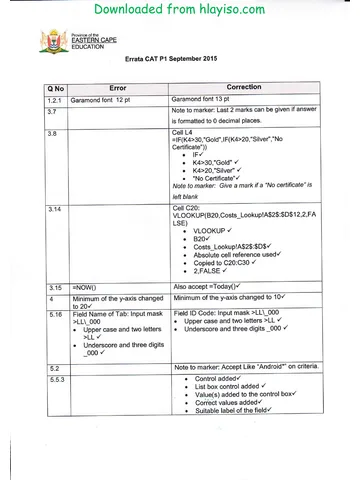
3.8 Cell L4
=IF(K4>=30,"Gold",IF(K4>=20,"Silver","No Certificate"))
IF
4
K4>=30,"Gold"
K4>=20,"Silver"
"No Certificate"
3.9 Cell C22=LEN(C16)
LEN function used 2
Correct cell range
Copyright reserved Please turn over
Downloaded from hlayiso.com
6 COMPUTER APPLICATIONS TECHNOLOGY P1 (EC/SEPTEMBER 2015)
3.10 Column M22
=COUNTBLANK(M4:M21)
2
COUNTBLANK
(M4:M21)
3.11 Cell O9
=N9*120
N9 3
* 120
O9 formatted to currency
3.12 Cell O22
=SUMIF(E4:E21,"F",O4:O21)
SUMIF
4
E4:E21
“F”
O4:O21
3.13 Sheet 1 renamed to Invoice 1
3.14 Cell C20:
VLOOKUP(B20,Costs_Lookup!A$2$:$D$12,2,TRUE)
VLOOKUP
B20
6
Costs_Lookup!A$2$:$D$12
Absolute cell reference used
Copied to C20:C30
2,TRUE
3.15 Cell D15
1
=Now()
Total for QUESTION 3: 42
Copyright reserved Please turn over
Downloaded from hlayiso.com
(EC/SEPTEMBER 2015) COMPUTER APPLICATIONS TECHNOLOGY P1 7
QUESTION 4 File: Q4Marks_Punte
No. Criteria Max. Mark
4.1 Graph
Correct data range used C10:I10 and C2:I2
Column chart created
Data labels centred
Legend renamed to Asanda Lamani 8
and correctly displayed
Minimum of the y-axis changed to 20
and Maximum to 100
Chart moved to Graph sheet
Total for QUESTION 4: 08
Copyright reserved Please turn over
Downloaded from hlayiso.com
8 COMPUTER APPLICATIONS TECHNOLOGY P1 (EC/SEPTEMBER 2015)
QUESTION 5 File: Q5_Reps Info
No. Criteria Max. Mark
5.1 5.1.1 Name of tab field appear before Model field
2
Primary key added to Name of tab field
5.1.2 Data type of DatePurchased field added to Date/Time 1
5.1.3 New field Operating systems
added before Screen size field 3
Data Type: OLE Object or Hyperlink
5.1.4 Field size of Review: Double
2
Decimal place: 1
5.1.5 Data type for Available colours field set to Lookup and
Colours Black, White, Grey and Red entered
Limit to list checked
2
(Note to marker: Accept two and more entries)
5.1.6 Field Name of Tab: Input mask >LL\_000
Upper case and two letters >LL 2
Underscore and three digits _000
5.1.7 Field Name of tab
Record no 6 spelling–from ‘Goegle’ to ‘Google’ 1
(Do not accept incorrect spelling)
5.2 Query: Q5Androids
Display all fields
Criteria: Like “A”
2
Copyright reserved Please turn over
Downloaded from hlayiso.com
(EC/SEPTEMBER 2015) COMPUTER APPLICATIONS TECHNOLOGY P1 9
5.3 Query: Device info
Only Name of Tab, Storage, Screen size and Current Value
fields displayed
Criterion for Current Value field: >10 000
Sorted by ‘screen size in alphabetical order
Saved as Q5Modified
4
5.4 Query: Q5Tabs Query
Deposit: [Current Value]*0.2
New field called Deposit
4
[Current Value]
Multiply
0.2
5.5 Form: Q5Signals_Seine
5.5.1 Operating system field removed 1
5.5.2 Date added as a field 2
In the footer of the form
(Do not penalise if both date and time are added)
5.5.3 List box control added to the form 5
Values (Wi-Fi, 3G, and LTE) added to the control box
List box controls links to Connectivity_Seine
Suitable label linked to Name/Discription of the field
Label formatted to resemble existing labels
(If candidate used a combo box instead of a list box they will
lose 1 mark)
5.6 5.6.1 Paper size changed to Letter 1
5.6.2 Page number inserted. 3
= “Page” &[Page]& “of” & [Pages]
Right Aligned
At the Bottom of the report
5.6.3 Date inserted 1
=Date()
5.6.4 =Count(*) 3
Any appropriate label: Total No of Tabs
5.6.5 Report Heading: Q5Favourites_Gunsteling 1
formatted to blue font colour
Total for QUESTION 5: [40]
Copyright reserved Please turn over
Downloaded from hlayiso.com
10 COMPUTER APPLICATIONS TECHNOLOGY P1 (EC/SEPTEMBER 2015)
QUESTION 6 File: Question6.Html
No. Criteria Max. Mark
6.1 1
<title>Tablets on wheels</title>
6.2 < img src = “Q6_Logo.jpg”
align = “right”
4
height = “100” width= “100”
6.3 <h1>Contact Details</h1> 1
6.4 <b>Address</b> 1
6.5 <font face = “Algerian” color = “red”>
3
<font> </font> tag
6.6 <ul type = “square”>
<li></li>
<li> Acer </li>
4
<li> Apple </li>
<li> Lenovo </li>
</ul>
6.7 Shipment
5
<table border = "5" cellpadding = "8"> </table>
6.7.1 <table border = “5”
6.7.2 cellpadding = “8”
<th> Standard </th>
<td></td>
6.8 <a href = "Tablets-v-textbooks.jpg"> "e-Books" </a href>
<a href> </a href>
3
“Tablets-vtextbooks.jpg”
Linked to the word “e-Books”
Total for QUESTION 6: [22]
Copyright reserved Please turn over
Downloaded from hlayiso.com
(EC/SEPTEMBER 2015) COMPUTER APPLICATIONS TECHNOLOGY P1 11
QUESTION 7 Open the file Q7Myfile
No. Criteria Max. Mark
7.1 Subfolder music created 1
7.2 MP3 Files moved into the music folder
(4 files) 1
7.3 Types of tablets Size = 11 KB 1
7.4 Selfie.docx protect with password
2
#Self12
7.5 Tables.docx converted to Tables.pdf
2
Tables.docx removed
7.6 Chart Staff_Personeel exported and linked
2
7.7 Ultimate7 compressed
2
Ultimate7 renamed to Q7Compress
7.8 Q7MyFile sorted descending by size
2
Screenshot added
7.9 Q7Answersheet_Antwoordblad
1
Students Name as Author
7.10 Envelope correctly created
Delivery address correctly entered
Return address correctly entered
Merge complete successful
4
Total for QUESTION 7: 18
TOTAL: 180
Copyright reserved Please turn over
Study this subject
Recommended for this subject
Memorandum
Computer Applications Technology Grade 12 P1 2015 Memo (Afr)
Errata
Computer Applications Technology Grade 12 P1 2015 Errata
Question paper
Computer Applications Technology Grade 12 P1 2015 QP (Afr)
Memorandum
Computer Applications Technology Grade 12 P2 2015 Memo (Afr)
Memorandum
Computer Applications Technology Grade 12 P1 2015 Memo (Afr)
Memorandum
Computer Applications Technology Grade 12 P1 2015 Memo (Eng)
More from Grade 12 Computer Applications Technology
Question paper
Computer Applications Technology Grade 12 P1 2025 QP (Afr)
Question paper
Computer Applications Technology Grade 12 P2 2025 QP (Eng)
Question paper
Computer Applications Technology Grade 12 P1 2024 QP (Afr)
Question paper
Computer Applications Technology Grade 12 P1 2024 QP (Eng)
Question paper
Computer Applications Technology Grade 12 P2 2024 QP (Eng)
Question paper